This topic has been closed for replies.

5 replies

Community Manager
August 30, 2024

Hi @jessicaf1069577317593771 @Fiinovation CSR @russellaticon 

Following up to check if you are still experiencing this issue or not. 


I understand how frustrating it can be when you’re unable to share a PDF for review, especially when it’s a crucial part of your workflow. We truly appreciate you bringing this to our attention and sharing your experiences.


We are fully committed to addressing issues like this and ensuring the app functions smoothly for all users. Your feedback is invaluable in helping us improve, and we’re actively working to find the cause of the issue.


If you’re still experiencing this issue, I encourage you to share any additional details or steps that led to it, as suggested by @Harsh Vats. This will assist us in diagnosing and fixing the issue more effectively.


Thank you for your patience and understanding as we work to make things right.


~ Tariq 

Adobe Employee
August 16, 2024

Hi @jessicaf1069577317593771 , thanks for reporting this,

Can you please provide the following information:
1. What is the current build that you are using?
2. Are you using dual monitor?
3. Click on Check for Updates.
4. If there is another update, first update and please try to reproduce the same issue and also share the latest build.


Thanks

Fiinovation CSR
Participant
August 2, 2024

We also face the same issue when we have to send CSR documents to our clients who use a different OS like Mac or Linux.

russellaticon
Participant
August 2, 2024

Same issue here. Interested to see the solution. I'm assuming it's a glitch and will be sorted in the next update.

creative explorer
Community Expert
Community Expert
August 2, 2024

@russellaticon turn off the Mockup Beta (AI Assistant), that might be the tip. Mine is off. And I don't dare try to turn it on if so many people are having issues with their PDFs...I don't want that issue! 

m
creative explorer
Community Expert
Community Expert
July 31, 2024

@jessicaf1069577317593771 using the same version but on a MacBook Pro. 

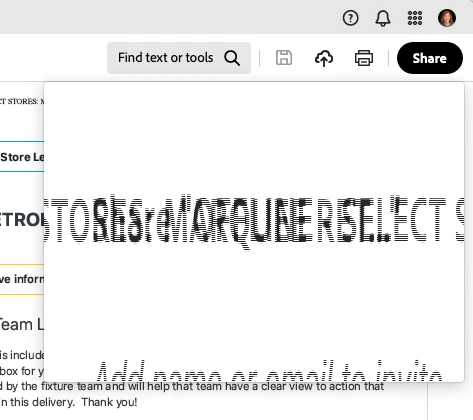
Curious to know is 'Enable New Acrobat' on....I get the weird text effect if it was switch back to the old Acrobat.


m
Participating Frequently
August 13, 2024

I had to have our IT guy roll us back to the previous version.  That was the only solution.