Answered
Case à cocher dynamique
Bonjour,
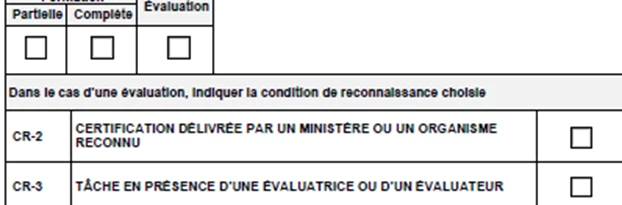
Je dois créer des cases à cocher radio (CR2 - CR3) qui sont active seulement si la case à cocher radio -Évaluation est coché.
Est-ce possible ? et comment faire ?
Merci

Bonjour,
Je dois créer des cases à cocher radio (CR2 - CR3) qui sont active seulement si la case à cocher radio -Évaluation est coché.
Est-ce possible ? et comment faire ?
Merci
There are a few different ways to create enabled fields. And they can be combined.
1. Show/hide fields
2. Make fields ReadOnly
3. Change color of field to make it look inactive.
These articles will help.
https://www.pdfscripting.com/public/Hiding-and-Showing-Form-Fields.cfm
The same techniques discussed in the article can also be used to set the readonly field property.
https://acrobatusers.com/tutorials/js_disabling_fields/
Here's some sample code for the "Evaluation" field:
Placed in the MouseUp
this.getField("CR2").readonly = (event.target.value == "Off");
this.getField("CR3").readonly = (event.target.value == "Off");
This code makes the CR fields readonly when the Evaluation field is unchecked.
Already have an account? Login
Enter your E-mail address. We'll send you an e-mail with instructions to reset your password.
 AdChoices