Exit
  • Global community
    • Language:
      • Deutsch
      • English
      • Español
      • Français
      • Português
  • 日本語コミュニティ
  • 한국 커뮤니티
0

change 150 dpi

New Here ,
Jul 03, 2022 Jul 03, 2022

How to convert to 150dpi and keep layers in a 300dpi PDF file?

TOPICS
Create PDFs
1.6K
Translate
Report
Community guidelines
Be kind and respectful, give credit to the original source of content, and search for duplicates before posting. Learn more
community guidelines
1 ACCEPTED SOLUTION
Community Expert ,
Jul 03, 2022 Jul 03, 2022

A few ways.. (Assuming you already have layers). Here are Two:

You can apply a Preflight Fixit to do the downsampling for you. There's a built-in one to do exactly what you want.
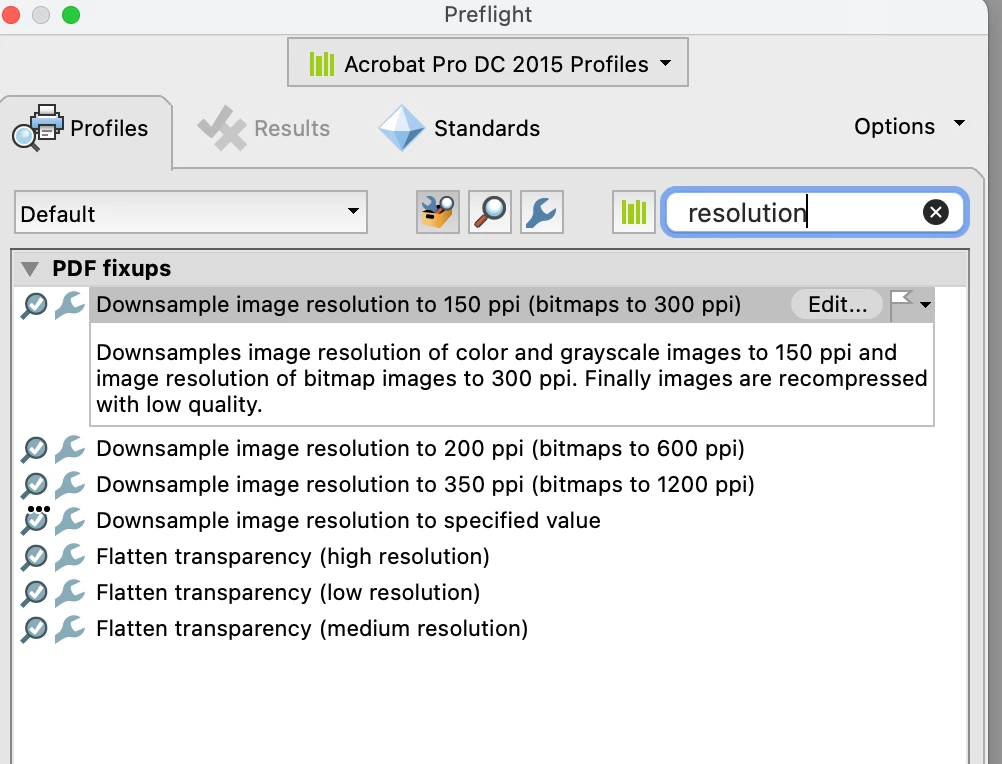
Screen Shot 2022-07-04 at 12.39.25 AM.png


OR

you could simply Save As Other > Optimized PDF and select a setting to resample your images to 150 for any image over 150.

Neither should affect the layering at all.

View solution in original post

Translate
Report
Community guidelines
Be kind and respectful, give credit to the original source of content, and search for duplicates before posting. Learn more
community guidelines
Community Expert ,
Jul 03, 2022 Jul 03, 2022

A few ways.. (Assuming you already have layers). Here are Two:

You can apply a Preflight Fixit to do the downsampling for you. There's a built-in one to do exactly what you want.

Screen Shot 2022-07-04 at 12.39.25 AM.png


OR

you could simply Save As Other > Optimized PDF and select a setting to resample your images to 150 for any image over 150.

Neither should affect the layering at all.

Translate
Report
Community guidelines
Be kind and respectful, give credit to the original source of content, and search for duplicates before posting. Learn more
community guidelines
New Here ,
Jul 04, 2022 Jul 04, 2022
LATEST

Apply a Preflight Fixit is OK


Thank you

Translate
Report
Community guidelines
Be kind and respectful, give credit to the original source of content, and search for duplicates before posting. Learn more
community guidelines
Community Expert ,
Jul 03, 2022 Jul 03, 2022
You can only influence the size/quality of image types (colour, grey, bitmap) but not certain images only.

Abambo
via mobile phone.
ABAMBO | Hard- and Software Engineer | Photographer
Translate
Report
Community guidelines
Be kind and respectful, give credit to the original source of content, and search for duplicates before posting. Learn more
community guidelines