New Participant
October 12, 2012
Answered

change font size on fillable adobe form fields

  • October 12, 2012
  • 6 replies
  • 225080 views

I have a fillable form on which I need to change the font and font sizes of the fields. I have adobe acrobat X Pro installed on my pc. Please help with step by step instructions.

Correct answer Steve Werner

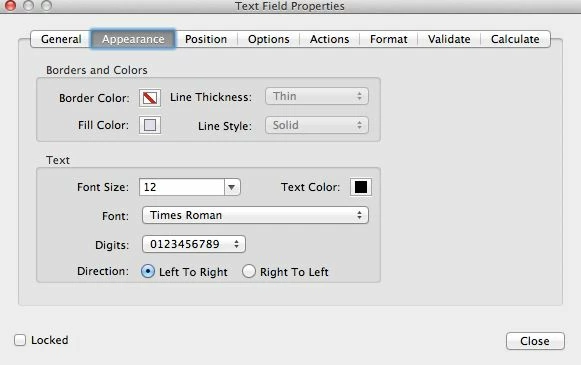
Choose Tools > Forms > Edit. Double-click on a text field to show its properties. Click on the Appearance tab.
6 replies

New Participant
March 1, 2022

The click Top Field<hold down Shift<click Bottom Field<select Properties worked and it was so easy. The only thing that I didn't find was the "format" tab to select the format category (such as date, SSN, Phone No. etc.). This was truly a time saver!

New Participant
August 10, 2021

I'm afraid double clicking only highlights the one word where the cursor is.  Can I get an explanation on how to get to the screen mentioned?


New Participant
May 11, 2018

It doesn't look like anything is solved here. Just to clarify the use case issue:

User makes interactive form text sections in InDesign. User exports to Acrobat. User wants to edit more than one text field property at a time to either a different font and/or font size.

...No solution..?

Inspiring
May 12, 2018

Have you tried selecting multiple fields at a time and bringing up the field properties dialog?

Scripting is really the most efficient way of dealing with this issue. Scripts for changing the font and other font properties have been posted a number of times in these forums, but if you have any trouble finding them, post again.

Qzzzzzzzzzzzz
Known Participant
November 7, 2017

Any way to make it greater than 18 pt font?

Bernd Alheit
Adobe Expert
November 7, 2017

Yes, enter the font size.

New Participant
November 22, 2017

Where?  The drop down only goes to 18, and I want to go for 36...

zikkom33196626
New Participant
August 2, 2017

"Choose Tools > Forms > Edit"?

Which tools in DC Pro?

Please be more specific.

try67
Adobe Expert
August 2, 2017

The Tools button, in the second screenshot.

zikkom33196626
New Participant
August 2, 2017

What about the second screenshot?

Please explain step by step.

Thank you!

Steve Werner
Steve WernerCorrect answer
Adobe Expert
October 12, 2012

Choose Tools > Forms > Edit. Double-click on a text field to show its properties. Click on the Appearance tab.

New Participant
September 9, 2021

You a life saver, even in 2021!