
Participant
May 26, 2021
Answered

Change Measure Tool Permanently to Metric

  • May 26, 2021
  • 1 reply
  • 8187 views

Hi, Can someone please advise if you can permanently change the measure tool to measure in metric? I know how to change it manually when using the tool but I want the default to be mm not inches. Thanks
Correct answer Amal.

Hi Nikki


Hope you are doing well and sorry for the trouble. As described you want to change the measurment unit to Milimeters permanentely


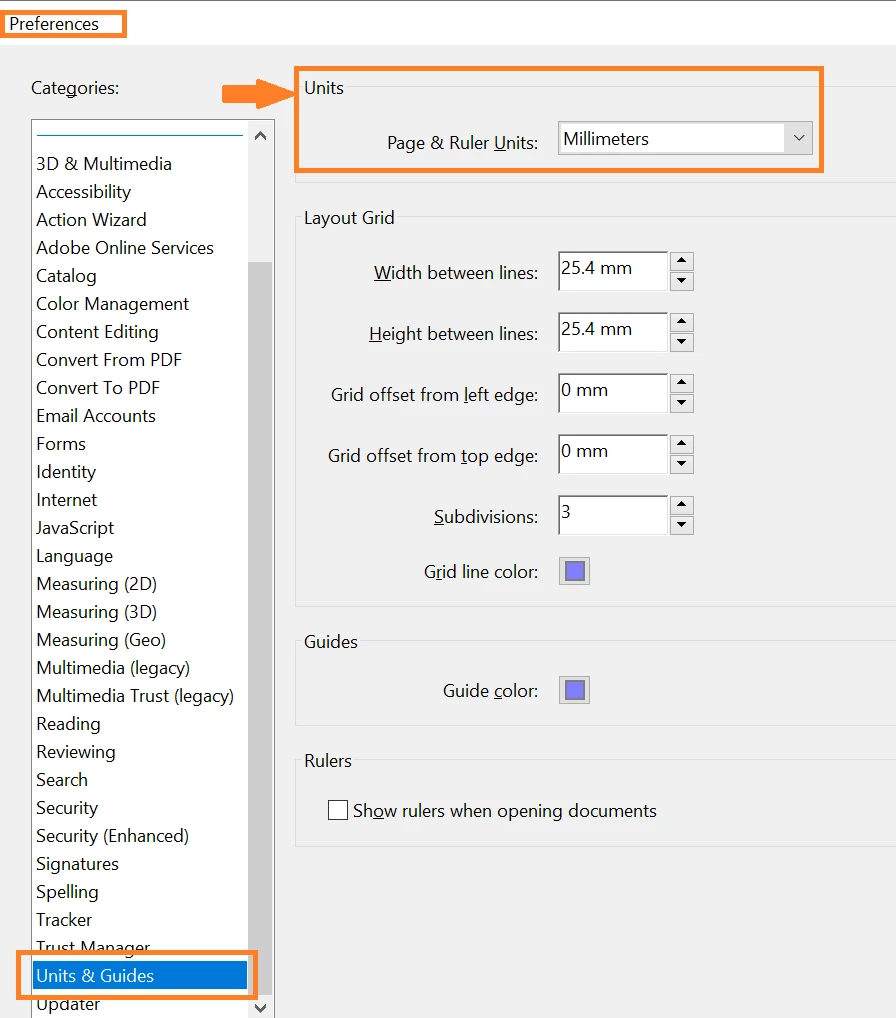
Please go to Edit (Windows), Adobe Acrobat (Mac) > Preferences > Units and Guids > change unit to Milimeter >Click OK and reboot the application.


Regards

Amal

1 reply

Amal.
Community Manager
Amal.Community ManagerCorrect answer
Community Manager
May 27, 2021

Hi Nikki


Hope you are doing well and sorry for the trouble. As described you want to change the measurment unit to Milimeters permanentely


Please go to Edit (Windows), Adobe Acrobat (Mac) > Preferences > Units and Guids > change unit to Milimeter >Click OK and reboot the application.


Regards

Amal

Participant
January 12, 2023

Hi

I'm using an old Win 7 pc with Adobe Acrobat Pro 9 Extended for my printers. How do I set Acrobat to permanently show mm instead of inches? No matter what I try, every time I open a document, it has reverted to Imperial measurements instead of staying on metric.

Amal.
Community Manager
Community Manager
January 24, 2023

Hi @Rod Cramb 


Acrobat 9 is an old and EOL application. For more information, please go through the help page https://helpx.adobe.com/acrobat/kb/end-support-acrobat-8-reader.html


Regards

Amal