Participating Frequently
Mar 11, 2018 10:40 PM UTC
Answered

Changing date format from American to English

Hi there. Could someone please tell me how I can change the date in a writable pdf in Adobe Acrobat from American to English format?

Adorobat
AdorobatCorrect answer
Participating Frequently
Apr 17, 2018 6:08 AM UTC

Hi Alisonf,

Sorry for the delayed response.

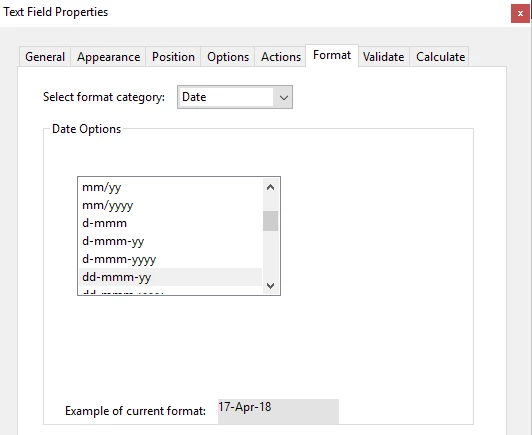
You can change date format by opening the form in Acrobat > Tools > Prepare form

Right-click date field > Properties > Format tab > format category > date options

Below is the screenshot:

Feel free to update this discussion in case you need further help.

Shivam

28 replies

Participant
Feb 3, 2025 1:00 AM UTC

This is not working in acrobat pro.. I am not allowed to modify this whilst creating an agreement and there isnt a "tools"area for this?

Translate
Souvik Sadhu
Legend
Mar 6, 2025 8:22 AM UTC

Hi @Tennille37524370ujvw,


Hope you are doing well. Thanks for writing in!


Custom Date validation is available with Acrobat. 

You might want to try changing the settings as mentioned here: https://adobe.ly/43lV9jV


Hope this helps.


-Souvik

Translate
HCListon
Participant
Sep 5, 2023 10:59 PM UTC

I have been trying for weeks to change the default date to American style, and have not been successful. I HATE this problem. It happened when some update occurred a few weeks ago. Every contract I prepare now takes about 3 or 4 times longer than it used to. If there is really no way to correct the date format, can someone please suggest an alternative vendor for processing contracts that need to be signed? Thank you.


Translate
Participant
Sep 13, 2023 11:14 PM UTC

just chatted with support an there is no way to do this. How ridiculous.

Translate
HCListon
Participant
Sep 14, 2023 12:48 AM UTC
Just for the record, I'm trying to do the opposite. I am American, and all
my documents now have European-style dates. I would like the default to be
MM/DD/YYYY, but it no longer is.
Translate
Participant
Oct 20, 2020 11:28 AM UTC

Is it posible to set a default date format (to the european standard, like YYY.MM.DD, or Norwegian standard DD.MM.YYYY). It realy should not be neede to have to change this for every dingle date field in every single document I am making, especially when I am making several documents a day that needs to be signed.

Translate
try67
Community Expert
Community Expert
Oct 20, 2020 12:40 PM UTC

No, unfortunately it's not possible. However, it is possible to change the Date format for multiple fields at the same time, using a script, like this (paid-for) tool I've created: http://try67.blogspot.com/2012/06/acrobat-apply-format-to-multiple-fields.html


Translate
Adorobat
AdorobatCorrect answer
Participating Frequently
Apr 17, 2018 6:08 AM UTC

Hi Alisonf,

Sorry for the delayed response.

You can change date format by opening the form in Acrobat > Tools > Prepare form

Right-click date field > Properties > Format tab > format category > date options

Below is the screenshot:

Feel free to update this discussion in case you need further help.

Shivam

Translate
Participant
Oct 28, 2025 1:52 AM UTC

Hi,


I am following these instructions but get as far as this: 

Acrobat > Tools > Prepare form

Right-click date field > Properties >


These are the only tabs I have on the date field, there is no format option. I've been going round in circles earching the rest of settings on Adobe and failing miserably. How do I get these settings when I am using Acrobat? 


Translate
Participant
Oct 28, 2025 2:02 AM UTC

I Googled it for you and got this:


The Actions, Format, Validate, and Calculate tabs are missing because the form was converted to a more limited Adobe Sign form or is a specialized field type. To fix this, revert the form to an Acrobat form by going to Tools > Prepare Form > More > Revert to Acrobat Form. For specific field types, like buttons, the properties may only be accessible through a custom script. 

Translate