


Participant
October 29, 2019
解決済み

Changing default size of radio buttons and check boxes

  • October 29, 2019
  • 返信数 2.
  • 6449 ビュー

I can't find a way to change the default sizes of radio buttons and check boxes in preferences. Are we stuck with 0.25 inch x 0.25 inch? Working with documents having oodles of buttons and boxes, it's painful to have to change each group or box when the default size is way too big. Thanks!

解決に役立った回答 ls_rbls

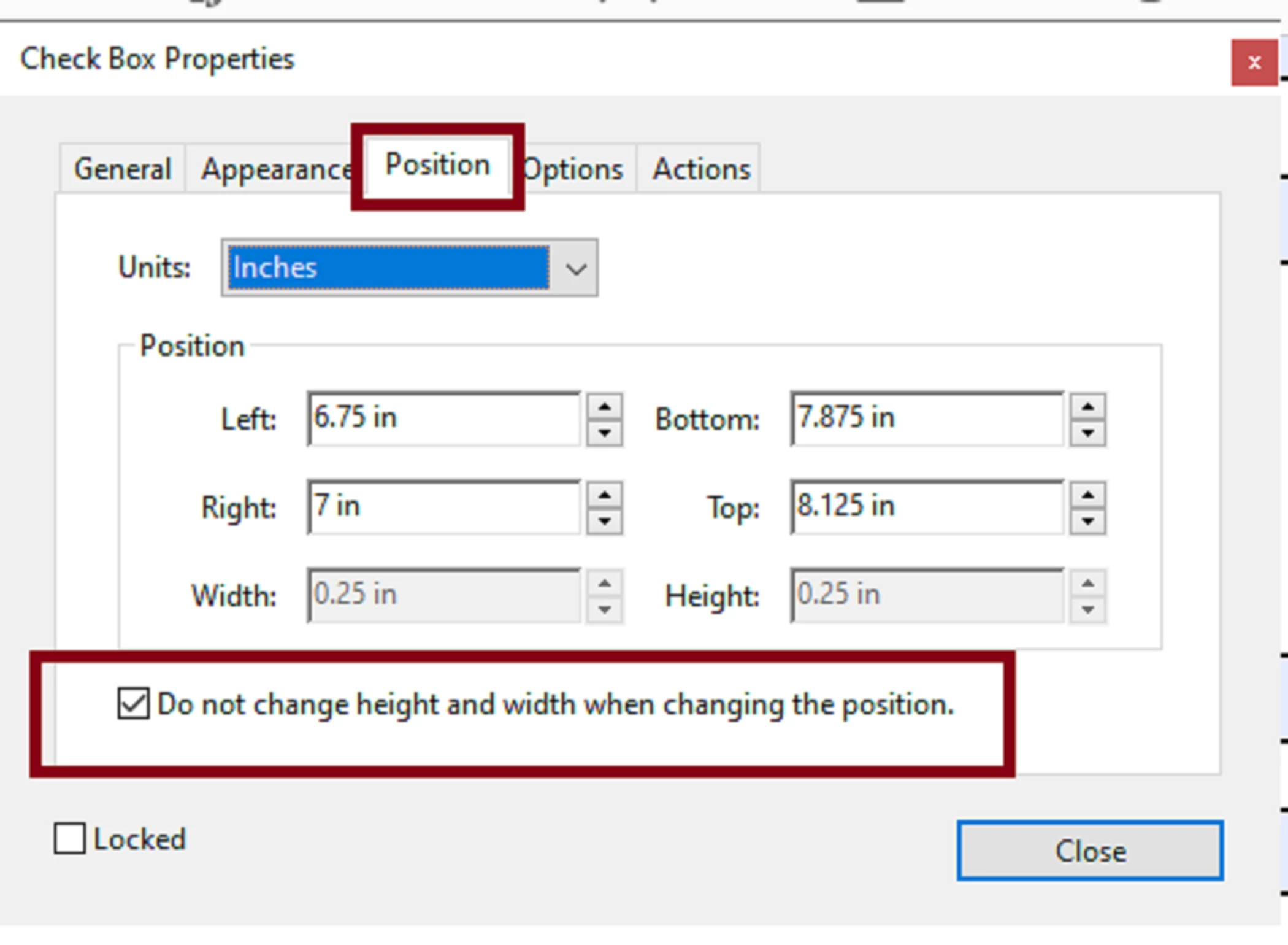
Yes it is a global setting and in addition if you're working on large PDF forms it is also convenient if you check "Don't change height and width when changing the position".


I've noticed that when you don't set this option and you're working with large groups of radio buttons or checkboxes, those dimension change frequently when you drag the selected group around in a work space. This setting in particular ensures consistency.

返信数 2

Known Participant
October 15, 2020

Did you ever find a solution?  I am struggling with this right now

Known Participant
October 16, 2020

I stumbled across an option on the radio button context menu.

So I can set up a button the size I want and then choose "Use Current Properties as Defaults"

This is working pretty good for what I needed.  I am not sure the scope of this, but I assume it is only for the current document.


ls_rbls
Community Expert
ls_rblsCommunity Expert解決!
Community Expert
October 17, 2020

Yes it is a global setting and in addition if you're working on large PDF forms it is also convenient if you check "Don't change height and width when changing the position".


I've noticed that when you don't set this option and you're working with large groups of radio buttons or checkboxes, those dimension change frequently when you drag the selected group around in a work space. This setting in particular ensures consistency.

Bernd Alheit
Community Expert
Community Expert
October 29, 2019

In the preferences of Acrobat there is no such setting.