
Participating Frequently
April 9, 2021
Answered

Changing Digital signatures in Adobe Fill & Sign Function

  • April 9, 2021
  • 1 reply
  • 1784 views

As I receive a request from a sender to sign on a PDF, can I sign on the intended field using digital signature instead of an Italic font of my name?


I want my signature to look like this:


Instead of this:
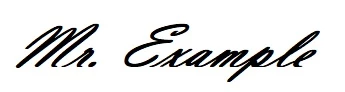
 

Thanks.

This topic has been closed for replies.
Correct answer Bernd Alheit

Hi Bernd, yes. I want to use Adobe Sign.


Post the question in the forum for Adobe Sign.

1 reply

Bernd Alheit
Community Expert
Community Expert
April 9, 2021

Yes, you can create your own appearance at Preferences > Signatures.

KianHAuthor
Participating Frequently
April 12, 2021

Hi Bernd, Thanks.


I've understood that this works under Acrobat's Certificates function. However now I'm exploring the options of having the same digital signature under "Fill & Sign" option.


My case is I have received a form through email from a co-worker that requests for my digital signature and as I clicked on the area box to sign, italic fonts of my name came up instead of a proper digital signature. I would like to change this.


I explored Preference > Signatures > Creation & Appearence however could not find relevant settings to change it. Would you mind to point me in the correct direction please?


KianHAuthor
Participating Frequently
April 12, 2021

I mean "Request Signature" option, not "Fill & Sign". My mistake.