
Check box centers now grey
I've created an editable form with many check boxes using Adobe Acrobat DC Forms.
The check boxes were displaying correctly in preview mode with the same color border and fill, and also displaying correctly when the form was emailed to, and opened in Adobe Reader by another person.
Now all the check box centers are grey until checked; when checked the border turns grey. The Properties still show the matching Border and Fill color, and I've tried resetting the fill color, but no change - the center fill color is always grey, and now also grey when emailed and opened in Adobe Reader.
I've tried testing setting up a new form with just a few check boxes from scratech, but it also has either grey borders or fill when both border and fill colors are set the same in Properties/Appearance.
What has happened and how can I fix??
I apprciate any support.
Previous correct check boxes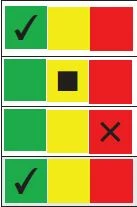
Now grey border or center fill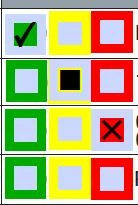
 AdChoices