simoncpa7
Participant
May 17, 2019
Question

Choice of text-to-speech voices in Adobe Acrobat

  • May 17, 2019
  • 1 reply
  • 1624 views

Hello,

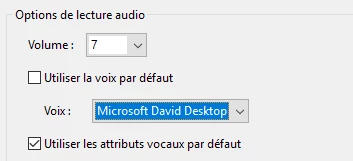
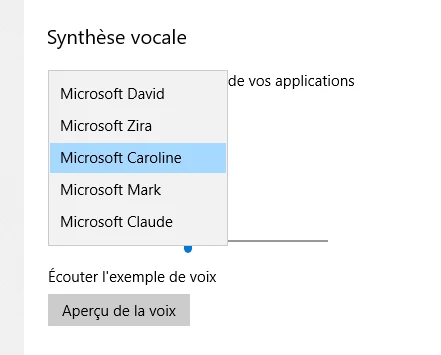
I would like to use the Microsoft default FR voice "Caroline" as the read-out-loud option of my document. But in the Adobat Acrobat preferences menu, I can only find the two default EN voices, even if my OS and software are both set up in French, and that the voice is indeed among the selected choices in the configuration panel.

How could I use this voice in Acrobat?

Thank you!
This topic has been closed for replies.

1 reply

Amal.
Community Manager
Community Manager
July 23, 2019

Hi Simoncpa,

Apologies for the delay in response, as you are experiencing an issue with selecting the default FR voice "Caroline" as the readout loud option, we need some more information for a better understanding.

In the meantime, you may try the following troubleshooting steps :

  • Update the application to the latest version. Go to Help>Check for updates.
    For more information about the latest version available, please refer to the link - DC Release Notes — Release Notes for Acrobat DC Products
  • Repair Installation. (Windows), Go to Help>Repair Installation.
  • Reboot the system and check.

Let us know if that brings any difference

Regards,

Amal