This topic has been closed for replies.
Correct answer ls_rbls

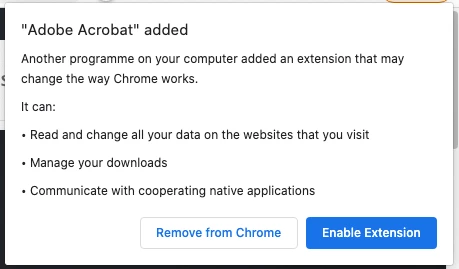
I think that in mobile cloud computing all extensions that you add to a web browser require this type of access.


If you're concerned about online privacy then you may also need to become aware that even with a VPN or a good firewall and proxy, these extensions will disregard features like "private browsing" and such.


Your best approach is to use a Chrome-based web browser that supports this extension but also lets you to manually set additional privacy settings that can  block  websites from accessing your sound card micropbone, the clipboard, webcam, etc... to include the ability to add script blockers, and most importantly, to give you the flexibility to browse anonymously.


hiding your IP address from websites that you visit (like behind the Tor network for example), block automatic redirects, and the ability to disable WebRTC (non-proxified UDP packets that are routed through both of the internal and public interface hanfled by your computer's network card), are some of the things that you should configure first before you add any extension(s) to a web browser. 


Then you can test for leaks and streamline security vulnerablities with a more solid approach.


This, however, still will not protect you, and won't  avoid to personally identify you while online since you, as the user, is agreeing to such terms when you install and enable such extensions.

2 replies

ls_rbls
Community Expert
ls_rblsCommunity ExpertCorrect answer
Community Expert
December 16, 2020

I think that in mobile cloud computing all extensions that you add to a web browser require this type of access.


If you're concerned about online privacy then you may also need to become aware that even with a VPN or a good firewall and proxy, these extensions will disregard features like "private browsing" and such.


Your best approach is to use a Chrome-based web browser that supports this extension but also lets you to manually set additional privacy settings that can  block  websites from accessing your sound card micropbone, the clipboard, webcam, etc... to include the ability to add script blockers, and most importantly, to give you the flexibility to browse anonymously.


hiding your IP address from websites that you visit (like behind the Tor network for example), block automatic redirects, and the ability to disable WebRTC (non-proxified UDP packets that are routed through both of the internal and public interface hanfled by your computer's network card), are some of the things that you should configure first before you add any extension(s) to a web browser. 


Then you can test for leaks and streamline security vulnerablities with a more solid approach.


This, however, still will not protect you, and won't  avoid to personally identify you while online since you, as the user, is agreeing to such terms when you install and enable such extensions.

Amal.
Community Manager
Community Manager
December 16, 2020

Hi Andy,


Hope you are doing well.


With Acrobat extension for chrome, its easy to convert web pages to rich high quality PDFs that maintain the look and feel of original content. The use of extension is governed by Acrobat DC End User License Agreement https://www.adobe.com/legal/licenses-terms.html#  and Adobe privacy policy https://www.adobe.com/privacy/policy-linkfree.html


PERMISSIONS REQUIRED BY ACROBAT EXTENSION FOR CHROME:

  • tabs: Used to interact with the browser's tab system.
  • downloads: Used to manage web-content downloads
  • contextMenus: Allows extension to add items to the context menu in Chrome.
  • nativeMessaging: Allows extension to exchange messages with cooperating native applications on user's devices.
  • Host permissions("http:///", "https:///"): Allows extension functionality on all webpages with http and https schemes.


Hope this information will help.


Regards

Amal