

Answered
Close PDF
How do you change the default to close only the document being viewed and not all the PDFs that are open.

How do you change the default to close only the document being viewed and not all the PDFs that are open.
One option would be to change your preferences to open each new PDF in a separate instance of Acrobat/Reader insted of in new Tabs. Preferences>General
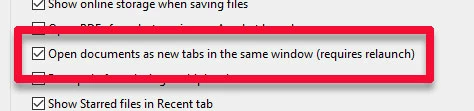
When you close a file with this setting deselected, you will close just that instance of the program.
I hope this is helpful.
My best,
Dave
Already have an account? Login
Enter your E-mail address. We'll send you an e-mail with instructions to reset your password.
 AdChoices