
Known Participant
November 17, 2021
Answered

Colors are much too saturated in Acrobat

  • November 17, 2021
  • 7 replies
  • 22223 views

I have a problem with the color display in Acrobat DC. Everything looks all right in Photoshop, InDesign and Illustrator, but when exporting to PDF and viewing in Acrobat the colors suddenly appear oversaturated. A lot. If I export a file from InDesign and then open the PDF up in Photoshop everything looks normal. Just not in Acrobat. My color settings are synced across all apps (to Europe General Purpose 3).

 I have tried changing settings in Acrobats color management, but nothing changes the appearance.

I also tried uninstalling Acrobat and reinstalling. This actually worked but only for a few days - then back to this frustrating situation. In the meantime, I changed nothing.

I can see a few threads like this but none solved. Anyone have the same problem or at suggestion to a solution?

I have attached a screenshot to highlight the issue.

Best regards, Peter
Correct answer subcomtom

This worked for me:
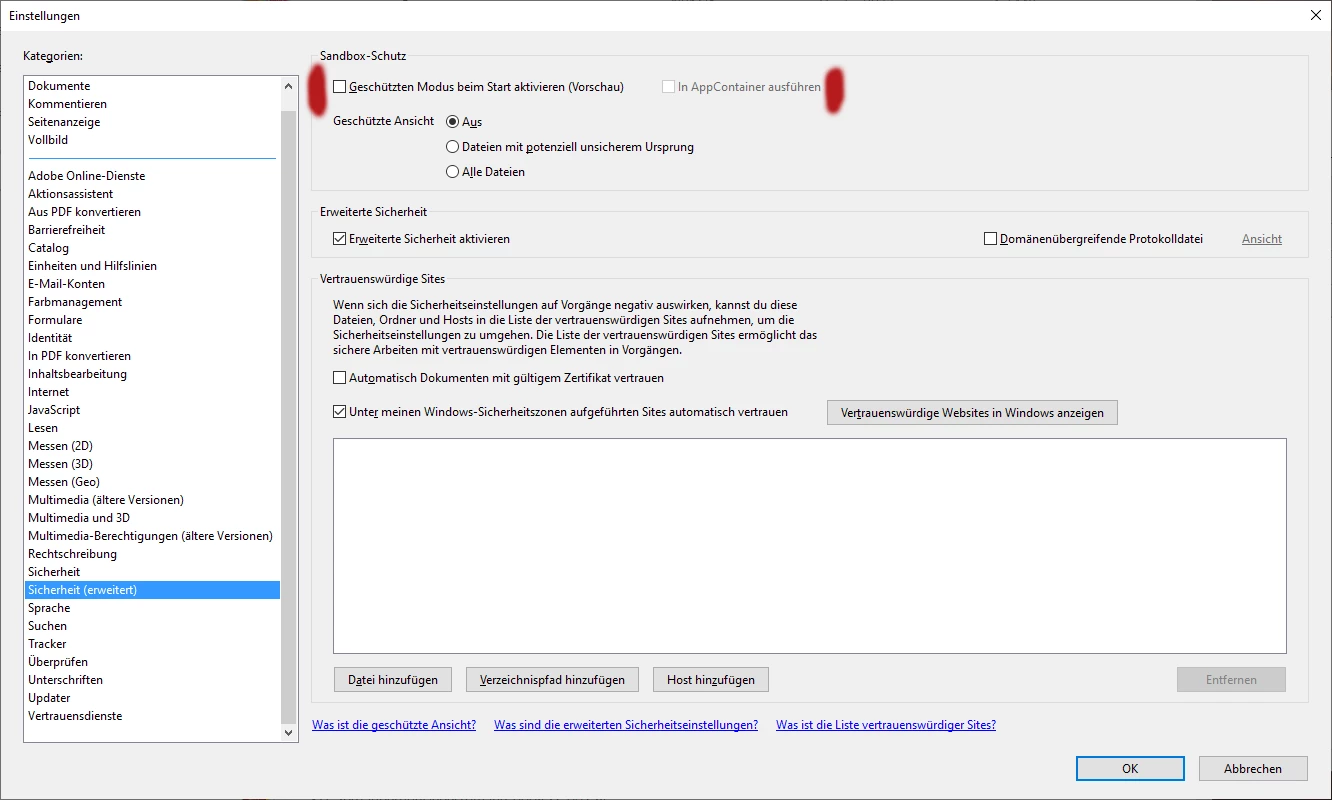
The synchronization of the color management between Acrobat DC and Bridge is broken in cause of security options.

Try to uncheck the Sandbox Security in the Security(extended) tab.
Here is a Screenshot from the german version:

7 replies

Participant
February 24, 2023

Hello! Unchecking "Sandbox Security" in the Security(extended) tab didn't work for me, but playing around with Color Management settings finally did. Try selecting different Working Space options, see what works for you.
Edit/ Preferences/ Color Management
Apple RGB worked best for me. The colors are not 100% the same, but I'd say 98% and are not oversaturated anymore.

Participating Frequently
September 9, 2022

I am having the same problem, but don't have the same settings as @subcomtom under my security settings. What to do? Can anyone help?

Karl Heinz  Kremer
Community Expert
Community Expert
September 9, 2022

Which version of Acrobat are you using? 

Participating Frequently
September 12, 2022

Here's a screenshot of the version number!

PatrikN
Participant
August 18, 2022

Hey, I just had this problem when exporting in CMYK for print. I resolved it by changing the "default transparency blending color space". Not sure if you tried it already but...

michaelk28355937
Participating Frequently
February 23, 2022

Hi Peter, i do have the exact same problem. When producing a pdf-file out of InDesign with my proven presets the pdf file looks oversaturated in AcrobatDC. When viewing the pdf in Bridge, opening the pdf file in Photoshop or even opening the file in Illustrator - colors look fine. I can measure the color values of my pdf-file within Acrobt and they are correct. It is the overall appearance of the colors, that looks strange and extremly artificial. Did you find a solution yet? Thanks!

Known Participant
February 24, 2022

Hi Michael

No I'm affraid not. I've searched and searched without any luck - and tried everything in the replies above. 
I was advised to make a formal bug report. But as I understand it, Adobe will only look into it, if it has a lot of backing/votes. Here's a link to it:
https://acrobat.uservoice.com/forums/590923-acrobat-for-windows-and-mac/suggestions/44776225-colors-in-acrobat-pro-and-reader-are-much-too-sa 

michaelk28355937
Participating Frequently
February 24, 2022

Hi Peter, thanks a lot for getting back. Yes, it is a very annoying thing with this strange color rendition in Acrobat. I produce print pdfs on a daily basis and every time i open up a pdf in Acrobat i become unsure whether I can use this data at all. I use the color picker to check the colors and give me confidence that the values are correct. But after all the displayed content in Acrobat looks similar to a $5 plastic monitor although i am using a reliable EIZO monitor. Let's hope that someone will find a solution ... Sincerely Michael

Known Participant
November 19, 2021

I have a similar problem. Some additional info and findings here:

https://community.adobe.com/t5/acrobat-reader-discussions/problem-with-color-management-wide-gamut-monitor/m-p/12536444 


I have also filed a bug report here:

https://acrobat.uservoice.com/forums/926812-acrobat-reader-for-windows-and-mac/suggestions/40081753-bug-problem-with-color-management-wide-gamut-mon 

(only got one vote so far).


The problem seems to still be present in the latest version of Reader DC (Windows).

Known Participant
November 24, 2021

Hi jjohanson - I backed the vote - hope something happens 😕😕

JR Boulay
Community Expert
Community Expert
November 18, 2021

How do you create the PDF and with what settings?

Acrobate du PDF, InDesigner et Photoshopographe
Known Participant
November 18, 2021

I export from InDesign using the standard [PDF/X-1a:2001] setting.

I've also been using other customized settings (and settings sent by print agencies) and the problem occurs every time. 

Karl Heinz  Kremer
Community Expert
Community Expert
November 17, 2021

Go into Acrobat's preferences and go to the Accessibility category. Make sure that "Replace Document Colors" is unchecked. This will sometimes get enabled by accident, and it will mess up your colors. If this does not fix your problem, let us know and I will look for other potential sources for your problem. 

Known Participant
February 8, 2022

Hi again Karl

I have still not been able to solve this. Have you guys had any luck or is this a lost case?
This hasn't always been an issue, I can only assume that it happened after an update. Hope somecan can help.
All the best.

Karl Heinz  Kremer
Community Expert
Community Expert
February 8, 2022

Peter, I don't work for Adobe, I am a user of Adobe's products, just like you. Your only way to get Adobe to see your problem is by filing a bug report at http://www.adobe.com/products/wishform.html - unfortunately, for the most part, this is a one-way street, so you wont get any feedback from Adobe about the state of your bug report. I see that you added support to another bug that was already filed, but my recommendation is to submit your own report. By having more reports about the same problem, the urgency for a fix gets raised.