



Question
com.apple.WebKit.Plugin.64.xpc | Mac osx Pop up | Safari Pop up
One of the following should help:
- On this dialog: provide the password and click on ‘Always allow’
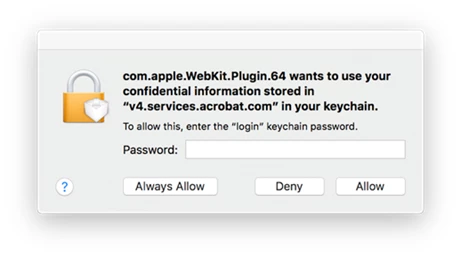
2. If above does not work:
- Go to ‘Keychain access’. Select 'login' from left side pane > search for 'v4.services.acrobat.com' from the corresponding list > double click on it > select 'Access control'.
- If there’s an entry of 'com.apple.Webkit.Plugin.64.xpc' delete it by clicking on '-'. Press 'Save changes' and provide your password.
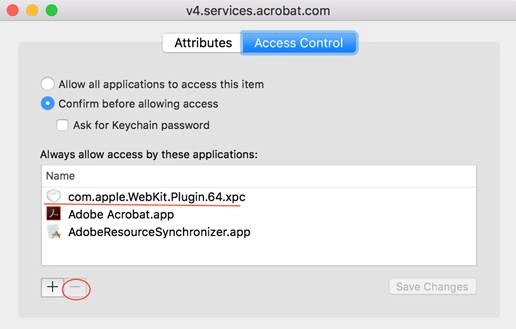
- Then manually get the plugin added. For that please click on '+' and traverse to the location /System/Library/Frameworks/WebKit.framework/Versions/A/XPCServices and select 'com.apple.WebKit.Plugin.64.xpc'.
- Press 'Save changes' and provide your password.
3. If this also does not work, then one last thing to try:
- Open keychain. Right click on 'Login' from left-hand pane and select 'change settings for keychain login'.
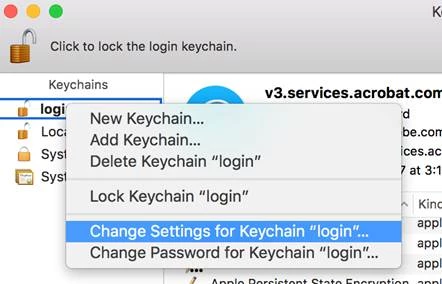
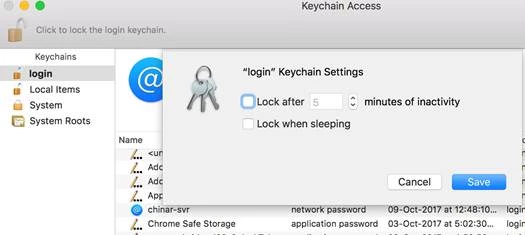
- Make sure both the options are unchecked as shown in the images below. If the options are checked then ‘login’ keychain might be getting locked after some time and that’s why it’s asking for a password to unlock it whenever it needs to access ‘login’ keychain.
Hope this helps
 AdChoices