
November 19, 2016
Answered

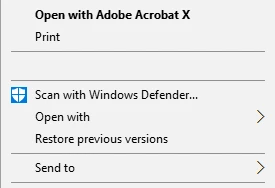
Combine Files, Right Click text & icon are missing, but I can still click on the blank area

  • November 19, 2016
  • 1 reply
  • 767 views

If I go to combine PDFs using my right click and click the blank area below, it goes to the combine PDF page.

Does anyone know how to get the text & icons to show? I've tried re-installing but still have the same issue.

Using Windows 10 and Acrobat X Pro
This topic has been closed for replies.
Correct answer Adorobat

Hi th190,

I am sorry for the delay in response.

Acrobat X Pro is not compatible with Windows 10, you might have issues in the working of the application. However, you might try the steps given in the following link:

Acrobat Pro X combine context menu is present, it's just blank.

Right-Click Context Menu's Acrobat X Pro Missing

Thank You,

Shivam

1 reply

Adorobat
AdorobatCorrect answer
Participating Frequently
November 25, 2016

Hi th190,

I am sorry for the delay in response.

Acrobat X Pro is not compatible with Windows 10, you might have issues in the working of the application. However, you might try the steps given in the following link:

Acrobat Pro X combine context menu is present, it's just blank.

Right-Click Context Menu's Acrobat X Pro Missing

Thank You,

Shivam