
June 20, 2012
Answered

Combine PDFs: Still cant right click and bring up "Combine PDFs" option

  • June 20, 2012
  • 3 replies
  • 71631 views

The option to combine PDFs by right clicking on the files does not appear on my machine.  I've read the fourms and tried the following:

1. All adobe products updated

2. uninstalled/reinstalled Acrobat Pro

3. repaired installation of Acrobat Pro

3. followed another forums suggestion of running: regsvr32 "C:\Program Files (x86)\Adobe\Acrobat 10.0\Acrobat Elements\ContextMenu64.dll". problem persisted. I got error message 0x80070005.

I have 100s of PDFs to combine! Thanks in advance for any suggestions!

(Win7, x64).
This topic has been closed for replies.
Correct answer Sandeep_V_

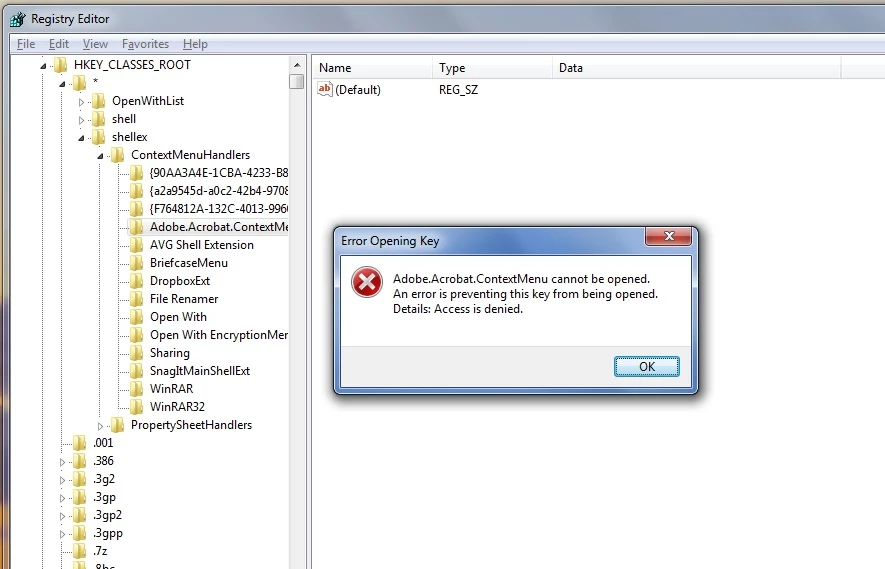
thanks.  I have the folder, but I'm blocked from opening it.  see attached screen shot


Please set permission on this registry key following step '1. (Advanced) Set permissions to their defaults in the registry' in this article: http://helpx.adobe.com/acrobat/kb/error-1402-error-1406-acrobat.html

This article is not for this issue. It just contains a step to set permissions on the registry keys.

3 replies

Yusriz
Participant
August 23, 2015

I also have this problem. After I uninstalled Google Drive, the acrobat context menu items appeared as usual. It seems Google Drive context menu has same name with Acrobat context menu that is "contextmenu64.dll".

August 4, 2015

Yes, I just installed Google Drive yesterday and my option to combine pdfs in the right-click menu has disappeared.  I have found, though that if you just click the blank space in the right-click menu where "Combine PDFs in Acrobat" used to be, it still works.  Kind of unfortunate but I'd rather keep Google Drive on my machine and just click a blank icon.

Bernd Alheit
Community Expert
Community Expert
June 20, 2012

In Adobe Acrobat choose File > Create > Combine Files Into A Single PDF.

June 20, 2012

thanks - yes the workaround is: In Adobe Acrobat File > Create > Combine.  But... right clicking on the file is soooo much faster and convieenent.  Every day for years I was able to simply right click to combine. When I switched to a new computer and upgraded Acrobat Pro I lost the beloved functionality of right click/combine. 

Participant
November 16, 2013

Hi Lawrence,

If this registry already available, please try the below mentioned steps and let me know if that works

  • Click Start, choose 'All Programs' > 'Accessories, and *right-click* on 'Command Prompt and 'Select 'Run as Administrator'
  • If you have 64-bit Windows, in the command window type the following and press Enter, including the quotes:

         regsvr32 "C:\Program Files (x86)\Adobe\Acrobat 10.0\Acrobat Elements\ContextMenu64.dll"

Regards,

~Pranav


I solved the problem after ununstall Google Drive. It seems to be a conflict with the contextmenu handler. See the attached pic from the uninstall report.