
Participant
March 11, 2022
Answered

Combining files automatically merge as a Portfolio!?!?

  • March 11, 2022
  • 2 replies
  • 29071 views

In the past couple of months, everytime I try to combine 2 or more PDFs into 1 PDF, Acrobat is pulling/merging it as a Portfolio!?!?!? I do not want this & don't understand how or what changed.  I have Acrobat Pro DC.  Help!  Does anyone know how to fix this?


Thanks.
Correct answer Meenakshi_Negi

Hi Becki,


Thank you for reaching out.


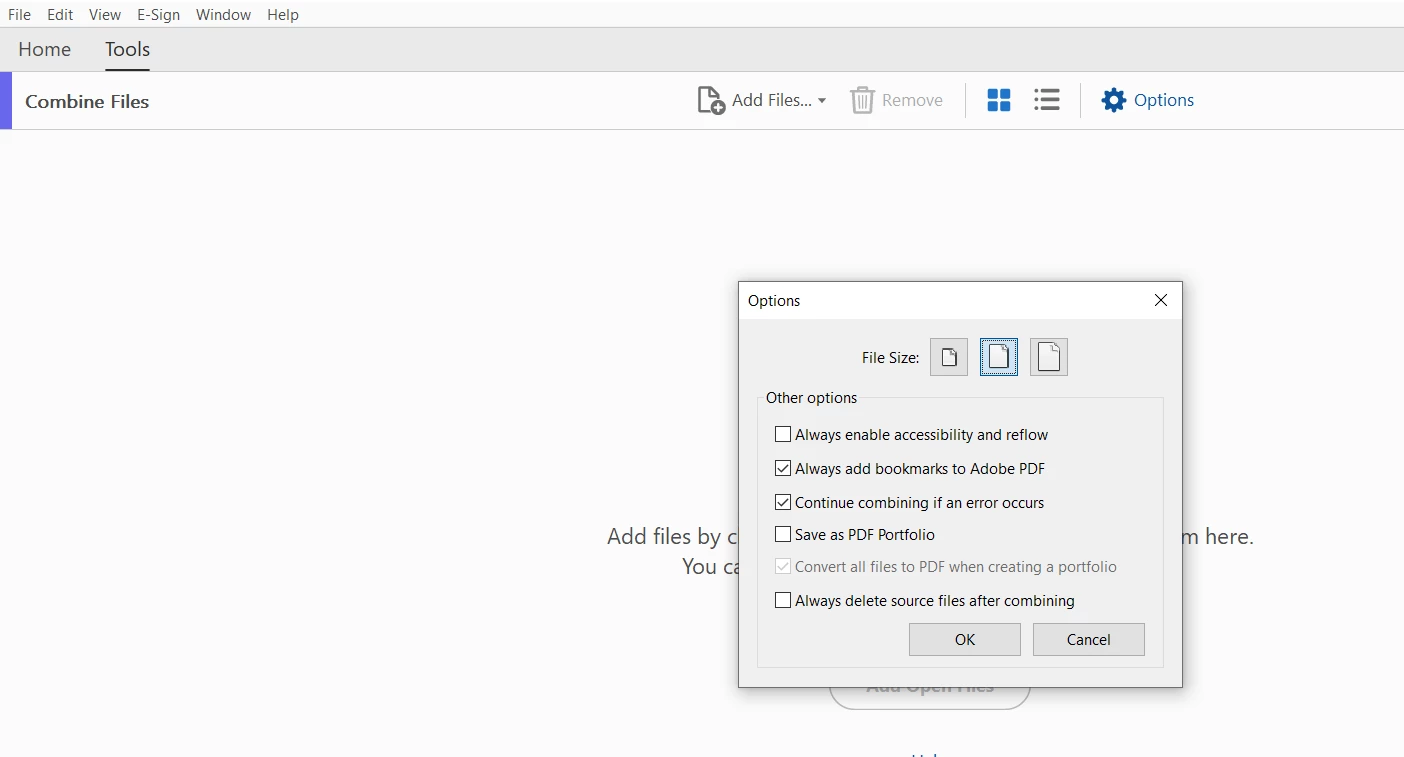
Please use the following steps to disable the creation of a Portfolio:

1. In Acrobat, go to Tools > Combine Files. 

2. Click on Options in the Combine Files window.

3. Uncheck the Save as PDF portfolio box and click on the OK button to save the changes.


Let us know how it goes.


Thanks,

Meenakshi


2 replies

Participant
November 15, 2024

Hi Adobe, please don't be aggressive and don't impose your preferred saving style on your customers. They have brains, they can think, they are all mostly highly educated, and they know what they want and need. DON'T CHANGE THE DEFAULT BEHAVIOR OF YOUR SOFTWARE ON THEIR BEHALF.

sincerely

AnandSri
Legend
January 6, 2025

Hi,

I hope you're doing well. Apologies for the delayed response and trouble.


Could you please share more details about the issue? Are you not able to combine files using Acrobat? We're here to help, just need more info.


Thanks,

Anand Sri.

tvjake2
Participant
March 15, 2025

I'm using forms to fill out info and Adobe keeps combining all my forms into one fecking form. STOP IT!!!!!!!!!!!!!!!!

Meenakshi_Negi
Meenakshi_NegiCorrect answer
Legend
March 11, 2022

Hi Becki,


Thank you for reaching out.


Please use the following steps to disable the creation of a Portfolio:

1. In Acrobat, go to Tools > Combine Files. 

2. Click on Options in the Combine Files window.

3. Uncheck the Save as PDF portfolio box and click on the OK button to save the changes.


Let us know how it goes.


Thanks,

Meenakshi


Participant
March 22, 2022

Thank you so much!!  That was too easy once I was told there is an options box in the Combine files.  Not sure how it got checked, but all should be good for me now!!  🙂

Meenakshi_Negi
Legend
March 30, 2022

That's great! Glad to know that the steps suggested resolved the issue.

Let us know if we can be of any further help.


Thanks,

Meenakshi