
Participant
May 18, 2022
Answered

Combining PDF portfolio documents

  • May 18, 2022
  • 2 replies
  • 3294 views

Using MS Outlook app, I've converted multiple emails into a single PDF portfolio document.  Works great.  Now I have several different PDF portfolio documents.  Is there a way to combine or merge the PDF portfolio documents into one?  Thanks
Correct answer Dave Creamer of IDEAS

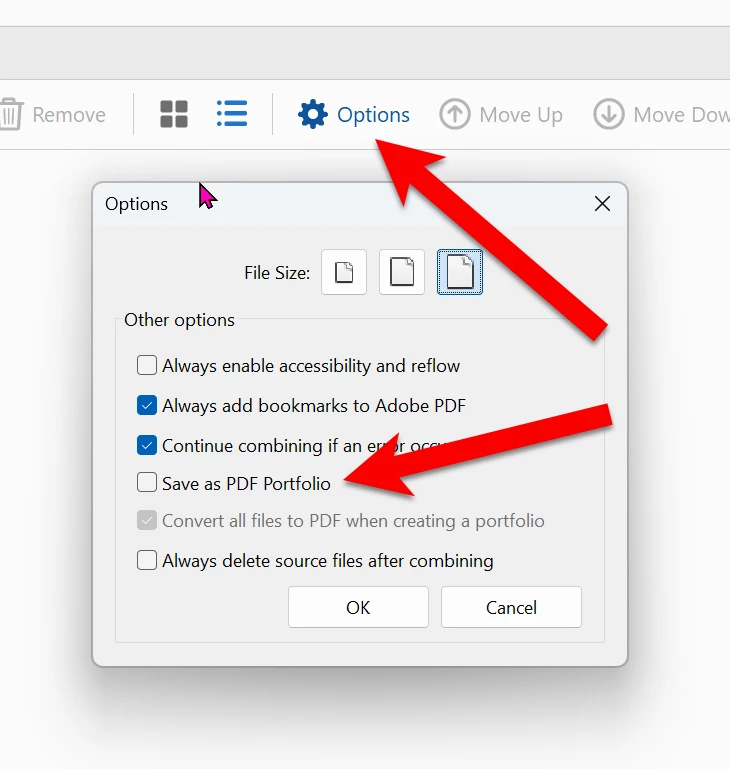
No, I don't think so; but I did figure out how to combine the portfolios into a single file.  It was the same as it always has been (under options, I unmakred the "Save as a PDF Portfolio".    Thanks for reaching out though!!


That is the solution for preventing a PDF portfolio when combining files, but it does nothing to convert a portfolio to separate PDFs, which was the original question. 

It's a good tip, however. In case anyone else is looking for the option, it is under the Combine Files tools, under Options (gear icon). 

2 replies

Dave Creamer of IDEAS
Community Expert
Community Expert
April 17, 2025

In the portfolio, go to list view.

Select all the documents.

Right-click and extract them to a folder.

Then combine the PDFs into one.


David Creamer: Community Expert (ACI and ACE 1995-2023)
Harsh Vardhan Pareek
Community Manager
Community Manager
May 20, 2022

Hi @James245094670x37 


Yes, you can combine PDF portfolios into one. For that the process is the same i.e using the combine files tool and because porfolio is basically a cobination of different PDFs it will add those PDFs and create a new portfolio. 


Let us know if that helps.


Thanks,

Harsh

Participant
April 17, 2025

That does not help.  I want a single document NOT a portfolio.  How do you do that.  It use to be easy and not it is totally messed up.

Dave Creamer of IDEAS
Community Expert
Dave Creamer of IDEASCommunity ExpertCorrect answer
Community Expert
April 17, 2025

No, I don't think so; but I did figure out how to combine the portfolios into a single file.  It was the same as it always has been (under options, I unmakred the "Save as a PDF Portfolio".    Thanks for reaching out though!!


That is the solution for preventing a PDF portfolio when combining files, but it does nothing to convert a portfolio to separate PDFs, which was the original question. 

It's a good tip, however. In case anyone else is looking for the option, it is under the Combine Files tools, under Options (gear icon). 

David Creamer: Community Expert (ACI and ACE 1995-2023)