
Combo Box/Dropdown list not selectable in certain areas of the box
I am not sure if this has been an issue behind Adobe, or forms in general or what, but I wanted to post this issue. I have noticed this within the native Adobe Acrobat DC app, Edge, Chrome, anything that opens a fillable PDF form.
Issue:
Currently, on the below image, you can see I have two combo boxes. Let's focus on the Company box. You can also see there are unfillable text, such as X-rays, Labs, and Vaccines.
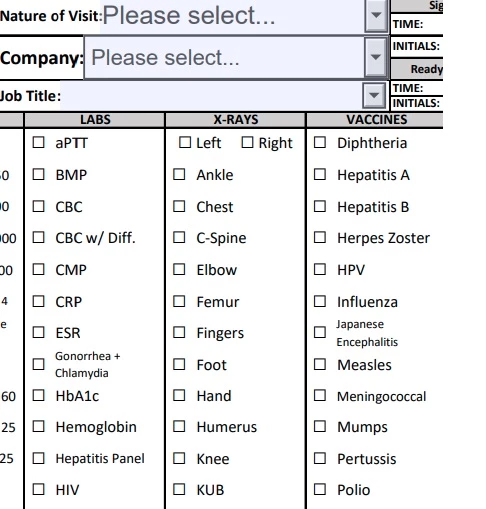
When I go ahead to select a company from the Combo Box, certain areas are selectable, while others areas are not selectable.
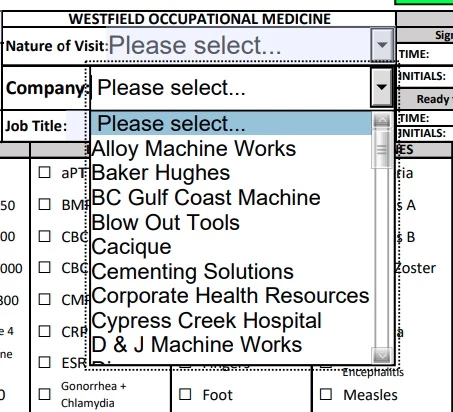
What I have noticed is that the combo box does not completely overlay the underlying text, making the cursor seem that the mouse is actually hovering the underlying text rather than an item I want to select within the Combo Box. I have to move my mouse to a specific location where there is no underlying text because these areas are the only areas that are selectable.
Does anyone have any workaround, or is this an issue with Forms in general across all platforms and applications? Is there a Java script that makes combo box completely overlay the underlying text so every area of the combo box is a possible selectable area?
 AdChoices