
Participating Frequently
November 7, 2019
Question

Commenting suddenly unavailable on mobile apps due to security settings

  • November 7, 2019
  • 3 replies
  • 6461 views

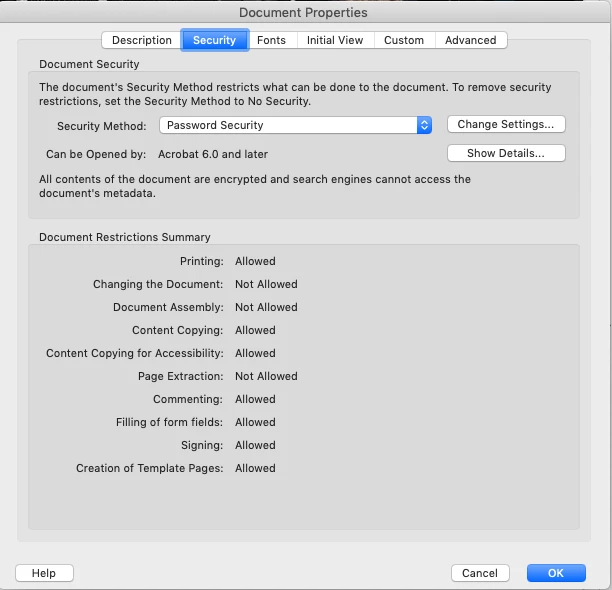
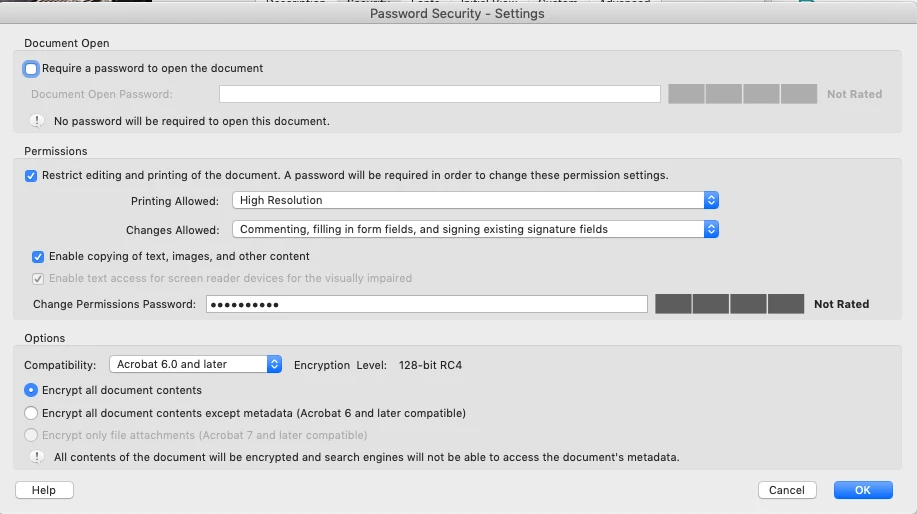
I've been creating PDFs with the same security settings for years. I restrict editing and printing of the document, but allow Commenting, Filling in form fields, and Signing existing signature fields. This has always made it so that my PDFs cannot be changed or reassembled, but can still be annotated with notes and highlights just as I need. Just in the past few weeks I've found that Commenting does not work on my PDFs in the Acrobat app on mobile devices only. Commenting works as usual in the desktop application, but i have tested in the mobile app on iPhone, iPad, and Android and now commenting is no longer enabled, even though my security settings have not changed in years. On iPhone and iPad, the edit icon is completely gone. On Android, the icon is there but I receive an error message when I click it that says "This tool is not available due to the document's security setting." If I remove my security settings, I then have access to com

ment again on mobile devices. 


Here are screenshots of my security settings. You will see that Commenting is allowed. Why is it that suddently commenting is not working on mobile devices? How can this be resolved?


Thank you!

This topic has been closed for replies.

3 replies

Participant
November 14, 2022

I have exactly the same problems: protected files cannot be commented on iPads or Android tablets with Acrobat reader, even if their security settings include allowing comments.  I don't know what to think, but my students tell me there are free Apps out there (both for iOS and Android) that allow commenting on such files and saving the comments.

Participant
December 17, 2019

Hi there, just wanted to note that I'm having more or less the same problem with an ebook I bought (from Bloomsbury). Commenting and highlighting works on my laptop, but with the app on my Android tablet, I do not get the option of highlighting text I've marked. When I try to make a comment in the document, I get the message "this tool is not available due to the document's security settings". But, I can clearly see that commenting is "allowed" when checking security settings on my laptop. I've been in touch with Bloomsbury, who claim they are unable to replicate the issue, and told me that "My app says 'The original document cannot be changed so a duplicate has been made'. We suspect it is some default your settings are on that a duplicate isn't automatically being made to allow you to highlight". This doesn't make much sense to me, but that's what they've said at least. I'm also unable to comment/highligh with a different app (e-reader Prestigio).


No matter it's exact origin, this is clearly a problem!

ls_rbls
Community Expert
Community Expert
December 18, 2019

Can you described the steps that you use when you try to comment and highlight with the Adobe Reader mobile app?


Ive been having a similar issue on my end only with PDF files that are password protected for editing content. I know it makes no sense... could be a bug.


But my work around was to save such file directly as PDF and use that one instead.

Participant
December 19, 2019

Images of the security settings of the document and the message I get when trying to "comment" are attached. I should be "allowed" to comment, but this does not work on my Samsung Android tablet nor Huawei phone. Both run Android OS, which I suspect is a root cause of the issue.

ls_rbls
Community Expert
Community Expert
November 7, 2019

Hi, 


Before you open a document with you  Adobe Acrobat Mobile app, open the mobile app and then login the  user account that you use from the Acrobat Pro paid subscription. It will unlock the premium editing features.

Participating Frequently
November 7, 2019

Thanks, but that's not the issue. Commenting is not a premium feature. It's available through the free app and I'm able to use it on PDFs without this security setting. It's just not available once I turn on this security setting. 

Participating Frequently
November 8, 2019

Correct, but I was not talking about commenting.


There has been too many updates in the month of October alone for Acrobat and Reader.


So what I was trying to say, and rephrasing now with less verbage is, if you've tried logging in to your account to see if that makes any difference?


There are users reporting things that used to work before that doesn't work anymore after the updates; regardless of computer architechture.  Another troubleshooting  angle would be to check if this is (or could be) related to a Creative Cloud Storage and sharing settings.


Another suggestion would be (and now talking about commenting) to open the file in Acrobat Pro in your computer, right click on any comment box, select Properties--->>  Properties Defaults, Save the file, upload to your mobile device and try again.


And just for troublehooting purposes, have you considered using your Adobe Acrobat Pro to  remove the password  security and all resttrictions, resetting the file to its original defaults, then saving a copy of the file as , like for example, MS Word; then convert back to PDF, and reapply your security settings on the newly converted file and try in your mobile device again.


These are just ideas that I would try.


Yes, logging into my account and removing all the security settings and adding them back has not made a difference. This is not just an issue with me. Ive heard from a bunch of colleagues right now and this is happening to everyone. Anyone who tries to access PDFs setup with these security settings is now having this problem. 


This appears to be an issue where these security settings are not allowing commenting on mobile devices, even though I have allowed commenting. 


Looking for confirmation that this is a new issue in Acrobat that is going to be fixed.


Thanks