
GarrettRN
Participant
August 19, 2022
Question

Completely Illegible PDF - HELP

  • August 19, 2022
  • 4 replies
  • 621 views

Hi All,

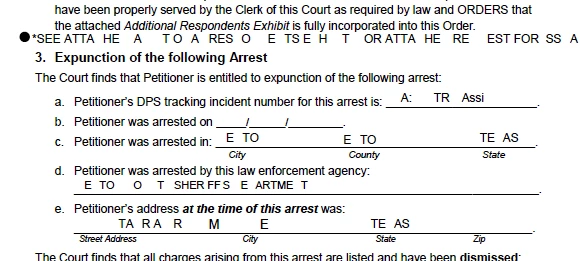
I am giving Adobe a "Second Try" as I like to use it for work...ANYWAYS - I was filling out a regular PDF doc I use frequently and this time I finished filling it out > Saved PDF > Uploaded it to eFile Court website and it came back "Illegible"... I looked at the PDF document that was uploaded and it was NOT LEGIBLE the 2 hours I spent filling this form out made it look like this (see below for screenshot) , wht did I do wrong and/or is there an explanation of what possibly could have happened and how to remedy ? 
This topic has been closed for replies.

4 replies

hammer0909
Community Expert
Community Expert
August 21, 2022

Were there form fields in this PDF or did you use the Fill & Sign feature?

maxwithdax
Community Expert
Community Expert
August 21, 2022

Looks like the font was not properly embedded in the PDF. What font is the form fields using?

Meenakshi Negi
Adobe Employee
Adobe Employee
August 19, 2022

Hi GarrettRN,


Thank you for reaching out.


Would you mind sharing the PDF with us so we can replicate the behavior?

Please confirm if the changes occur after you upload the PDF. Or it happens when you fill and save the changes made in the PDF.

Share the Acrobat and OS versions as well.


Thanks,

Meenakshi

JR Boulay
Community Expert
Community Expert
August 19, 2022

Can you share this (not filled) PDF?

Acrobate du PDF, InDesigner et Photoshopographe