
Containers split into separate letters
Hello!
I've attached the document I am working on - for the accessibility experts it's not finished, so please don't worry about the "Structure Tree" issue if you run the document through PAC3.
When working on this document I have come across this issue where some of my tags separated into individual letters:
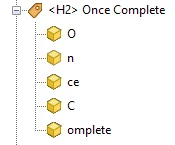

In other editing programs (like Foxit) you can use an "Edit Object" tool and it allows you edit the sentence or phrase by pasting the contents of one blue box together, this will amalgamate the containers in the Content, Tags and Reading Order tabs.
I know that if the letters are separated like this into different containers like this it doesn't really hinder screen readers unless it breaks up words such as "your", where if it it's split up into each letter, the screen reader will USUALLY say "your" but if it's broken up so that the y and our are separated the screen reader will say "y" & "our". Meaning if parts of the tag that is broken up is an actual word this causes a problem.
Another problem this is causing me is each of the containers within the tags are different numbers within the screen reader panel.
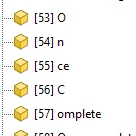
How do I fix this in Adobe Acrobat WITHOUT having to open the document into Foxit and use the "Edit Object" trick described above OR using the "Edit PDF" tool to simply delete the text that is broken apart and typing it right back into the PDF - hoping this doesn't cause font to not be embeded, and then trying to embed that text, without losing all your previous work or have that font embed correctly but it work in Adobe, but if you open the document in another program (like Foxit or Nuance) that font somehow is NOT embeded?
Thank you anyone for your help!
@Bevi Chagnon - PubCom.com I know you have been able to answer all my questions lately and you seem to have quite a bit of expertise in issues that appear when trying to create Accessible PDF and Forms
Thank you again!
Cyndy
 AdChoices