
Inspiring
August 26, 2024
Answered

Contract Labor Rates

  • August 26, 2024
  • 1 reply
  • 339 views

Good afternoon,


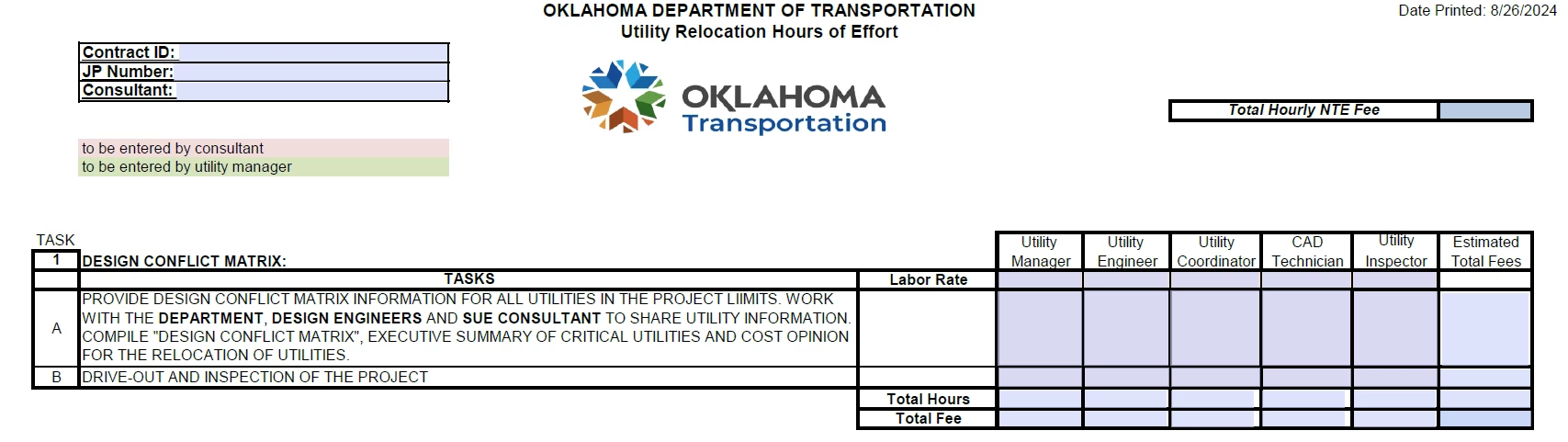
I need some help writing a script for a negotiation form. I have multiple contracts (CI-2485A, CI-2485B, CI-2485C, etc.) each company has the same professions but different rates.


If I put CI-2485A in the Contract ID field, I want that company's rates to populate the rates for each profession.


Do I have to use this script under each profession or is there a quicker way?

var a = this.getField("Contract ID")

if (event.value == "CI-2485A") {

               value = "Amount 1";

} else if (event.value == " CI-2485B") {

               value = "Amount 2";

} else if (event.value == " CI-2485C") {

               value = "Amount 3";

} else {

               // do nothing

}
 

Thank you,

Badhawg66


This topic has been closed for replies.
Correct answer PDF Automation Station

One method you can use is a dropdown for the Contract ID, with the corresponding rates as the export values.  Use a separator in the export values (example:  27.50--13.75--19.73--35.45--33.89).  Then split the export values by the separator like this:

event.value=this.getField("Contract ID").value.split("--")[0]; //for 27.50

event.value=this.getField("Contract ID").value.split("--")[1]; //for 13.75, etc.

I have a (paid for) tool to populate a dropdown by copying and pasting an Excel column into a window to make it easier, but it is not necessary.  This video shows how to do it.

1 reply

PDF Automation Station
Community Expert
Community Expert
August 26, 2024

One method you can use is a dropdown for the Contract ID, with the corresponding rates as the export values.  Use a separator in the export values (example:  27.50--13.75--19.73--35.45--33.89).  Then split the export values by the separator like this:

event.value=this.getField("Contract ID").value.split("--")[0]; //for 27.50

event.value=this.getField("Contract ID").value.split("--")[1]; //for 13.75, etc.

I have a (paid for) tool to populate a dropdown by copying and pasting an Excel column into a window to make it easier, but it is not necessary.  This video shows how to do it.