Niklas Lindvall
Participant
October 12, 2017
Answered

convert pdf to pdf/a batch process

  • October 12, 2017
  • 2 replies
  • 14839 views

Hi.

I have some 14 000 files that I need to convert from pdf to pdf/a.

Can that be done using Acrobate Pro DC?

Looking forward to any help on this topic.

//Niklas

This topic has been closed for replies.
Correct answer try67

In theory, yes. You can use an Action (Tools - Action Wizard) to save your files as PDF/A. Just add a Save command and under its options select the following:
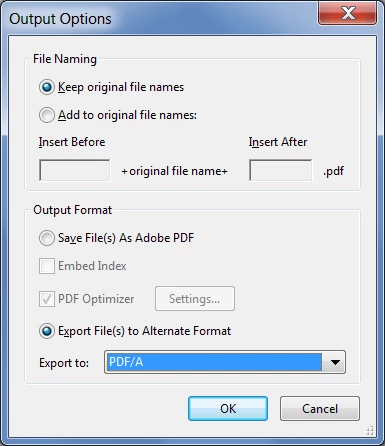
In practice, however, 14K files is way too much to Acrobat to handle in a single Action. You'll need to do it in batches.

From my experience 500 files is the maximum Acrobat can handle (depending on file-size and complexity) before choking/crashing.

2 replies

Niklas Lindvall
Participant
October 12, 2017

Thank you!

Works out fine the way you described.

When setting this up I even found a preset action for doing this, called "archive document", or something alike, I use a swedish version so I'm not sure my translation is correct.

They set it up with a prefligt action wich seem to shorten the process per file.

I have not tried all the 14k files yet but it works fine with some 100 files.

try67
Community Expert
try67Community ExpertCorrect answer
Community Expert
October 12, 2017

In theory, yes. You can use an Action (Tools - Action Wizard) to save your files as PDF/A. Just add a Save command and under its options select the following:

In practice, however, 14K files is way too much to Acrobat to handle in a single Action. You'll need to do it in batches.

From my experience 500 files is the maximum Acrobat can handle (depending on file-size and complexity) before choking/crashing.

Participant
April 4, 2023

Does anyone have any idea why this is no longer an option in Adobe Acrobat Pro? I mean the file format PDF/A is not listed anymore among the drop-down options when you choose to Export File(s) to Alternate Formate as in the screenshot above.