

StudioRydo
Participating Frequently
August 15, 2024
Answered

Corrupted dialogue boxes — Acrobat currently unusable!

  • August 15, 2024
  • 2 replies
  • 4435 views

As of last week, I started experiencing some bugs while using Acrobat. The first I noticed was that the dialogue window which opens when clicking the share button appears corrupted and — with the usual icons / options not visible — results in a workflow dead end. I have taken to attaching PDF files manually within Mac Mail … fine but not amazing as I always usually view PDFs in Acrobat before sending to clients, etc and share directly from the application. 


That's annoying but obviously not too difficult to work around. The next / main problem is a simlar corrupted dialogue window which appears after files are opened. This is completely unselectable and means that I have to force quit Acrobat every time it happens. (ie Pretty much every time I open it!)
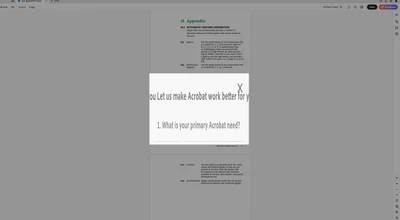


Using Acrobat for basic reviewing / sharing tasks has been absolutely integral to my workflow my entire career and I struggle to remember any other occasions where it just doesn’t work!

I reported an issue with page transitions not working in full screen mode nearly four years ago and it still hasn't been fixed as far as I'm aware. Not great at all but something you can live without … this is more worrying though.


Anyone else experienced this problem? Any recommended fixes?  


This topic has been closed for replies.
Correct answer Harsh Vats

Thanks for reporting this @StudioRydo
Can you please provide the following information:
1. What is the current build that you are using?
2. Are you using dual monitor?
3. Click on Check for Updates.
4. If there is another update, first update and please try to reproduce the same issue and also share the latest build.


Thanks
Harsh

2 replies

Inspiring
August 15, 2024

Yes, same issue. It is Mac related. No one running Windows seems to be having any of these problems. I tested the exact same document on my Windows machine and my Mac. Both have the latest versions of Acrobat and their OS installed. The Windows machine gives me something looking more like the old UI and all the tools work, share, OCR, Edit a PDF, etc. When I open the document in my Mac and click on Share I get a rectangle with large, strange looking fonts that appear to be the name of the file. When I try to do OCR, I go to the left hand tool bar, click on Scan & OCR, the Convert toolbar comes up with choices for what I want to do, but if I pick Recognize Text in this file, then I get a blank box and can't do anything. Once I have if I move around to different edit tools, the Edit and Convert toolbars no longer work. This is not happening at all on the Windows version, only Mac.

Harsh VatsCorrect answer
Adobe Employee
August 16, 2024

Thanks for reporting this @StudioRydo
Can you please provide the following information:
1. What is the current build that you are using?
2. Are you using dual monitor?
3. Click on Check for Updates.
4. If there is another update, first update and please try to reproduce the same issue and also share the latest build.


Thanks
Harsh

StudioRydo
Participating Frequently
October 1, 2024

@StudioRydo - yes I had the same thing happen to me yesterday when I was trying to do OCR. Reverted back to old Acrobat and it worked fine.


Damn! I restarted Acrobat and that fixed it this time … glad it was more easily rectified on this occasion! 


StudioRydo
Participating Frequently
August 15, 2024

U P D A TE


Uninstalled and re-installed Acrobat, using uninstialler and Creative Cloud app. 

Tip: You may need to restart your computer after doing the Acrobat uninstall so that Creative Cloud registers that Acrobat has been removed.  Reinstalling is easy from there. 

StudioRydo
Participating Frequently
August 15, 2024

U P D A T E — 2

Restarted Acrobat following a prompt related to AI plugin … and this issue with corrupted dialogue windows disabling the software started AGAIN. Seems there is really a problem somewhere … 

Going to unistall and reinstall for a second time. 

StudioRydo
Participating Frequently
August 15, 2024

 This is the prompt to restart Acrobat, which appeared to cause the issue to happen again after my first uninstall / reinstall …