
Participant
March 4, 2021
Question

Create Serial Letter with Excel as Datasource and Radiobuttons

  • March 4, 2021
  • 3 replies
  • 953 views

I'm quite new to Acrobat, l'd ordered Acrobat DC and now i'm wondering How2 use it for my case.

I'd created order forms in Word with Option Buttons
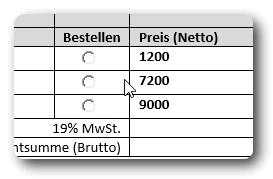
Now i want to create a clickable PDF and send it to our customer.
At least i should be a serial letter Excel -> Word -> Acrobat

No Problem to create a PDF with Acrobat, but Radiobuttons are not Clickable

No Problem to Create Clickable Buttons in Acrobat but since that should work as Serial Letters?

Do you have any advice for me, is there a documentation for this case?

Is that even feasible?


Is there a Documentation for using Java in Acrobat?
I want to calc if the customer clicks the Radiobutton e.g.1200, add + 19% and the sum under the Brutto field


This topic has been closed for replies.

3 replies

JR Boulay
Community Expert
Community Expert
March 4, 2021

What is your process to export from Word to PDF?


Assuming you're using Windows, if the form fields are done correctly and the document is exported correctly, with the correct settings, there is no reason why these buttons should not be clickable in the PDF.

Acrobate du PDF, InDesigner et Photoshopographe
try67
Community Expert
Community Expert
March 4, 2021

Multiple questsions there...


- Fields: All fields have to be created from scratch in Acrobat. They are not copied over from Word or Excel.


- Generating multiple letters based on a template: This is called a Mail Merge operation. You can do it using some versions of the PDFMaker plugin for Word, or using a script, like this (paid-for) one I've created:

https://www.try67.com/tool/acrobat-mail-merge-and-email-pdf-files


- Calculations: This can be done in Acrobat, using JavaScript (not Java), or with the built-in Simple Field Notation option, or the Sum/Product/etc. options in the Calculate tab. Your description will require a script, I believe.

See this tutorial for more info: https://acrobatusers.com/tutorials/how-to-do-not-so-simple-form-calculations


Ralf5E87Author
Participant
March 4, 2021

Thx,

but i'm not sure that i understand that right.

So i can not generate Multiple Letters with Word and clickable Buttons?
Cause i need to create the Buttons in Acrobat?
And i can not generate Multiple Letters in Acrobat with Excel as Source.

So Acrobat is the wrong toll for me?

try67
Community Expert
Community Expert
March 4, 2021

- Correct. If you want the files to have buttons you need to create it first in Acrobat.

- Not quite correct. You just need to convert the Excel file to a plain-text file first, and then you'll be able to perform Mail Merge with the data from it in Acrobat.

Nesa Nurani
Community Expert
Community Expert
March 4, 2021

Hi, if those buttons don't do anything when you converted them, can you just delete them and insert new buttons in acrobat?

Are you using those as mutually exclusive buttons?

What do you mean by "Serial Letters"?

Ralf5E87Author
Participant
March 4, 2021

Hi,

yes i can delete the Buttons and create new with Acrobat.

Serial Letter, google translation from Serienbrief.
Same Letter to many Clients with different content from Excelsheet