
Participant
February 10, 2022
Question

Creating drop-down sections

  • February 10, 2022
  • 3 replies
  • 524 views

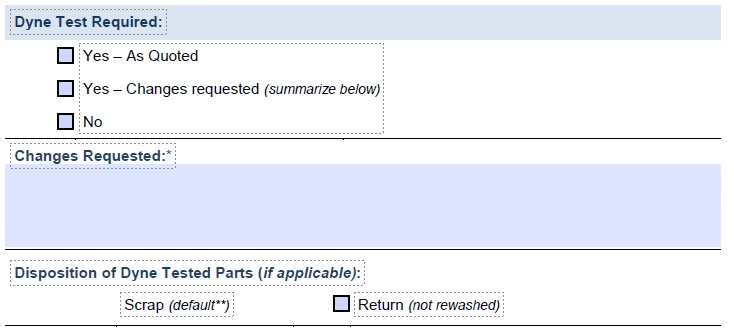
Is it possible to create 'sections' that operate as drop-downs?  Example below: I have a fillable pdf where I would like to make the 'dyne test required' heading a drop-down where everything underneath either hides or becomes visible.  Even if a complete section will hide depending on the value of a check box, it would be benificial.  I know this might be a stretch. 


    This topic has been closed for replies.

    3 replies

    try67
    Community Expert
    Community Expert
    February 10, 2022

    You can hide fields, but not static text. In order to hide that you would need to place a white (read-only) field on top of it and make it visible when you want the text to be hidden, and vice versa.

    When the fields are hidden it does not mean that the page will "reflow", though, to fill in the gap. There will just be a blank area on the page where the fields are.

    Thom Parker
    Community Expert
    Community Expert
    February 10, 2022

    The short answer is No.  PDF's are like paper, there is no practical way to collapse a section of a form like you would with a web page. 

    However, it is possible to hide and show fields. And with some complex scripting you could create the appearance of a popup menu of checkboxes, or even hide/show a section of a form, but you couldn't move the other content around it, you'd just be left with a blank spot on the form.


    You can create this kind of behavior with an AEM PDF form. This is a type of PDF form that is not really a PDF. But it can be displayed in Acrobat and very few other PDF viewers.  To create one you need the AEM designer. 


    Thom Parker - Software Developer at PDFScriptingUse the Acrobat JavaScript Reference early and often
    LinSims
    Community Expert
    Community Expert
    February 10, 2022

    Assuming you are talking about Acrobat Pro, I'll move this to the Acrobat forum for you.


    Adobe produces dozens of softwares. It is a very good idea to tell us which one you're asking questions about.


    The Using the Community forum is for help in using the Adobe Support Community forums, not for help with specific programs, installation issues, or account issues such as subscription questions or billing problems, or generalized questions about Creative Cloud services.

    * Product questions should be posted in the associated product community.
    * Installation questions should be posted in the Download & Install community.
    * Account issues, including subscription questions or billing problems, should be posted in the Account, Payment, & Plan community.
    * Questions about the Creative Cloud desktop app or general questions about apps in the Creative Cloud should be posted to the Creative Cloud Services community.

    Participant
    February 10, 2022

    Oh, thank you! I didn't realize there where multiple.

    LinSims
    Community Expert
    Community Expert
    February 10, 2022

    You're welcome. One of the things ACPs do is show new members the ropes and explain how things work. 


    If you want to see all available forums, Adobe Support Community. Or just click on the words Adobe Support Community at the top of any page. You'll be taken to the home page for the site, which has a list of all the publicly available forums.


    If you have any questions about where things are or how to do something forum-related, post again in Using the Community. Someone will be happy to help you.