


Exit
  • Global community
    • Language:
      • Deutsch
      • English
      • Español
      • Français
      • Português
  • 日本語コミュニティ
  • 한국 커뮤니티
0

CRL download error - Cannot connect to server.

New Here ,
Jan 04, 2024 Jan 04, 2024

Hi,
adobe is unable to download Certificate revocation list from local authority.
I'm using this manual : https://helpx.adobe.com/acrobat/kb/revocation-check-fails-for-ldap-url-certificate.html
ldap URL should be in format : ldap://ds.example.com:389/dc=example, dc=comwhere ds.example.com is the hostname.

Although very vague description, I added two expected url adresses  to the cert template.

One with query:

?certificateRevocationList?base?objectClass=cRLDistributionPoint
One that ends without the query


I changed this and I can see in log that Adobe Cannot still cant connect to server.
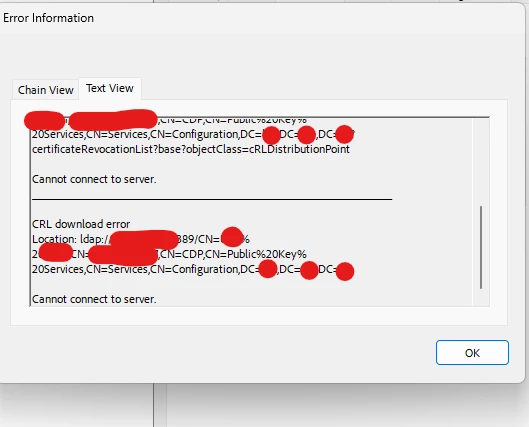
Tom24324836hvgf_1-1704377931904.png


Yet when testing the exact same url with :

certutil –split -URL ldap://....... url it works as expected and recovers CRL list , and I can see the communication with WireShark
Yet I don't see Adobe even trying to connect to the server in WireShark

Adobe version : newest 23.8.20458.0 ,Contnuous Release | Version 2023.008.20458 | 64-bit

TOPICS
Modern Acrobat
1.2K
Translate
Report
Community guidelines
Be kind and respectful, give credit to the original source of content, and search for duplicates before posting. Learn more
community guidelines
Adobe Employee ,
Jan 04, 2024 Jan 04, 2024

Hi @Tomáš24324836hvgf


Hope you are doing well and thanks for reaching out.


Please check out the correct answer marked in the similar discussion (https://adobe.ly/3TNgmyo) and see if that works for you.


~Amal

Translate
Report
Community guidelines
Be kind and respectful, give credit to the original source of content, and search for duplicates before posting. Learn more
community guidelines
New Here ,
Jan 05, 2024 Jan 05, 2024
LATEST

Hi, yeaah we tried and that did not work unfortunately, we're running latest version from adobe.com

Translate
Report
Community guidelines
Be kind and respectful, give credit to the original source of content, and search for duplicates before posting. Learn more
community guidelines