
Participant
March 7, 2018
Answered

Cropping to the trim box!!

  • March 7, 2018
  • 3 replies
  • 15014 views

How, in 2018, can it still not be possible to crop a pdf by simply choosing the box (trim, bleed, crop) that you want to crop to? This seems like the most useful and fundamental task that you could perform in Acrobat, but as far as I can tell, there is still no way to simply crop to the trim box. And don't tell me to Remove White Margins because that doesn't work when there are crop marks in those margins.

Sorry if I sound angry, but really, I've been trying to get the answer to this for ten years.

Here's where somebody can embarrass me and answer the question that I bet thousands of other people also have, so go for it.

Thanks,

RV
This topic has been closed for replies.
Correct answer Karl Heinz Kremer

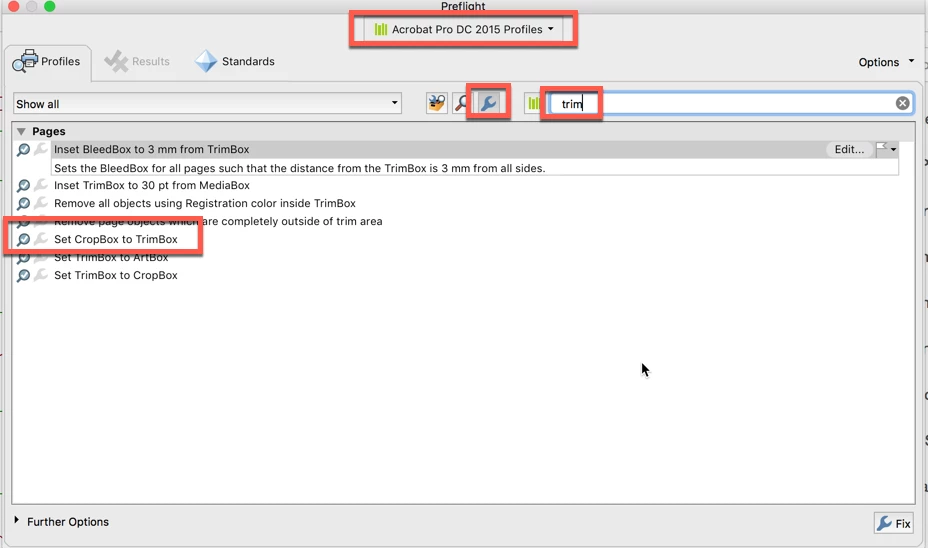
Good catch! Yes, there is a preflight fixup to do just that:

3 replies

Ransom77
Inspiring
July 20, 2023

Since I’m afraid that my yesterday’s post got lost due to an (unintentional) positioning, I’m now catching up with it at the (hopefully) right place.

Hi folks,

since three days I am desperately trying to cut DIN A5 pages (landscape) to DIN A6 pages using Acrobat XI Pro in order to be able to create a brochure using PdfBooklet. This is because PdfBooklet wants “real” DIN A6 pages and not “pseudo” DIN A6 pages, which are in fact (still) DIN A5 pages, because Adobe considers it “useful” to just hide the “cut away” part and not actually cut it away.

I tried creating a custom command (“Set CropBox to TrimBox”) via JavaScript, or a preflight profile of the same name – nothing worked, or I couldn’t get it right.

Since I see from this (albeit outdated) thread that there is such a preflight profile since Acrobat Pro DC 2015, would it be possible to post it here so that I can at least import it into my outdated preflight (Acrobat XI Pro)? If so, my very best thanks in advance.

Ransom77


Ransom77
Inspiring
July 24, 2023

Hi folks,

So you can understand my problem. This is what a booklet with PdfBooklet looks like when real DIN A6 pages are used:


This is what a booklet with PdfBooklet looks like when “fake” DIN A6 page are used – i.e. DIN A6 pages which were achieved by cutting a DIN A5 page (landscape) into right and left halves:


I have tried so many things: the “Trim and shift ...” module of Quite Imposing Plus, the “Resize Pages .... ” as well as “Crop to TrimBox” tool from abracadabraTools 2020, Remove hidden information, and also the attempts mentioned in the previous post (custom command, preflight profile) – nothing has helped, it is not possible to create a completely normal booklet with PdfBooklet, because any invisible (not removed) information of the PDF messes up the otherwise perfectly working PdfBooklet (based on Python).

I join the thread creator (2018) or ask for help here: Is it not possible, using Adobe Acrobat (XI Pro), to simply cut a page apart, so that one gets, for example, two real DIN A6 pages from a real (resp. scanned) DIN A5 page (landscape)?

I don’t understand why Adobe makes such a simple (and obvious) task so incredibly difficult (resp. impossible for me). I have no problems with Adobe implementing all the special cases (Art Box, Bleed Box, Trim Box, MediaBox, Crop Box and BBox) to provide professional users with everything they need for their work, but it should also be possible to implement such a simple task, as you still know it from tinkering as a child, in a straightforward way.

Greetings,
Ransom77

Inspiring
October 12, 2023

Why would Adobe remove an Acrobat function that worked ?
I like the new Acrobat feature: "Don't open the application when I double click a PFD file feature, because there are so many  processes running."

Legend
March 7, 2018

I think I saw a preflight profile that does exactly that.

Karl Heinz  Kremer
Community Expert
Karl Heinz KremerCommunity ExpertCorrect answer
Community Expert
March 7, 2018

Good catch! Yes, there is a preflight fixup to do just that:

RandyV711Author
Participant
March 8, 2018

Thank you to both of you guys for remembering and finding that obscure profile! If I can just remember it, it will be a lifesaver.

Karl Heinz  Kremer
Community Expert
Community Expert
March 7, 2018

I don't think this is a very common problem - at least based on my experience here in the Adobe Forums, but also on the old AcrobatUsers.com site. If you find a feature that is missing from Acrobat, you can always post a new feature request: Feature Request/Bug Report Form or jump straight to the Acrobat section: Acrobat for Windows and Mac: Top (1232 ideas) – Share your feedback on Acrobat DC

You can however accomplish what you want with a few lines of JavaScript, which you can then wrap in e.g. a custom command (see here Create Custom Commands in Adobe Acrobat DC Pro - KHKonsulting LLC )

for (var i=0; i<this.numPages; i++) {

    var ar = this.getPageBox("Trim", i);

    this.setPageBoxes("Crop", i, i, ar);

}

rubens31957275
Participant
March 15, 2022

That is beautiful, thank you very much for sharing it Karl. Worked like a charm!