
Participant
July 18, 2024
Answered

Custom calculation script not working

  • July 18, 2024
  • 1 reply
  • 644 views

I've tried every variation I can think of to make this work and it just isn't.


As seen below, the dropdown is for the customer to choose their payment method.

If they don't select one, the number in the column to the right is 0..

If they select "Wire (no fee), the number in the column to the right is 0.

If they select "Credit card (3% fee), the number in the column to the right is the Invoice Total x 3%
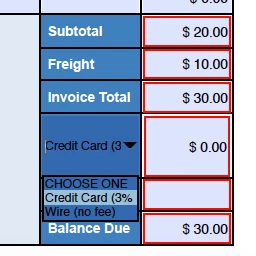
 

Here is the formula I'm using (everything is calculating correctly except the Invoice Total x 3%):

var v = this.getField("PaymentMethod").valueAsString;

if (v=="CHOOSE ONE") event.value = "0";

if (v=="Wire (no fee)") event.value = "0";

if (v=="Credit Card (3% fee)") event.value = (AmountInvoice_Total*.03);

This topic has been closed for replies.
Correct answer PDF Automation Station

When you use AmountInvocie_Total in your last line you need to identify the field:

this.getField("AmountInvoice_Total").value

Unless you have already created a variable from that field and you're not showing it in your script.  Also:

1)  Is the calculation order correct?

2) Is "Commit select value immediately" check in the options tab of the dropdown?

If you set export values in the dropdown you don't need an 'if' statement.  Example:

event.value=this.getField("AmountInvoice_Total").value * this.getField("PaymentMethod").value;


1 reply

PDF Automation Station
Community Expert
Community Expert
July 18, 2024

When you use AmountInvocie_Total in your last line you need to identify the field:

this.getField("AmountInvoice_Total").value

Unless you have already created a variable from that field and you're not showing it in your script.  Also:

1)  Is the calculation order correct?

2) Is "Commit select value immediately" check in the options tab of the dropdown?

If you set export values in the dropdown you don't need an 'if' statement.  Example:

event.value=this.getField("AmountInvoice_Total").value * this.getField("PaymentMethod").value;


Participant
July 18, 2024

Thank you so much I got it to work!