
Participating Frequently
November 2, 2020
Question

Custom Calculation Script

  • November 2, 2020
  • 3 replies
  • 1068 views

I wrote out a formula in Excel and then tried to convert it to an Adobe form...

In Excel...
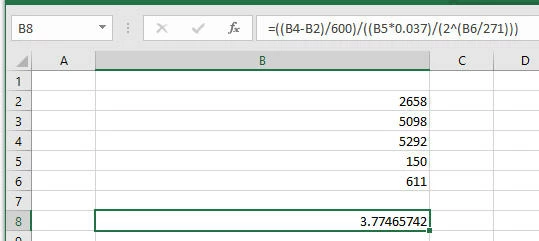
 

For the Custom Calculation Script

I set up the 5 fields as A, B, C, D, E,

For the equation i wrote...

event.value = ((getField("C").value - getField("A").value ) / 600) / ((getField("D").value * 0.037) / (2 ^ (getField("E").value / 271)))

Any help in getting this on track would be greatly appreciated.

This topic has been closed for replies.

3 replies

Bernd Alheit
Community Expert
Community Expert
November 2, 2020

May be a problem with ^

hlandorAuthor
Participating Frequently
November 2, 2020

I was wondering if that might be the cause.  I tried ** but that generated errors....

I Just found another operator, Math.pow() and that works...so the formula is  now   


event.value = ((getField("C").value - getField("A").value ) / 600) / ((getField("D").value * 0.037) / (Math.pow(2, (getField("E").value / 271))));


Thank you all so much for the help!!

The best to all and be well...

try67
Community Expert
Community Expert
November 2, 2020

In addition you should account for the situation where there's a division by zero (because field "D" is empty, for example), which will result in an error message if you've set the calculated field to have the Number format.

Thom Parker
Community Expert
Community Expert
November 2, 2020

Were any errors reported in the Console Window?

You'll find a tutorial on using the Console here: https://www.pdfscripting.com/public/Free_Videos.cfm#JSIntro

It may help if the calculation is broken into separate lines of code, where you can ensure each part is done correctly.


Please explain the exact problem. 


Thom Parker - Software Developer at PDFScriptingUse the Acrobat JavaScript Reference early and often
hlandorAuthor
Participating Frequently
November 2, 2020

I am not seeing any errors when i write the script, select ok in the editor or when i close the test field properties.

Inspiring
November 2, 2020

What do you have trouble with?

hlandorAuthor
Participating Frequently
November 2, 2020

I am getting a result of 00 so i assume something is wrong with the script.