Exit
  • Global community
    • Language:
      • Deutsch
      • English
      • Español
      • Français
      • Português
  • 日本語コミュニティ
  • 한국 커뮤니티
0

Data picker isn't working

New Here ,
Aug 01, 2022 Aug 01, 2022

Good morning,
On Friday, I installed the latest version of Adobe Acrobat Pro DC. I want to create a form in which the date is entered, among other things. Unfortunately the date picker does not show up (I set the field as "date"). I was trying to edit my old form and create new one (and I was trying this on both my PC and laptop), Date picker isn't showing. I have no idea what can I do to make it works.


TOPICS
Create PDFs
6.8K
Translate
Report
Community guidelines
Be kind and respectful, give credit to the original source of content, and search for duplicates before posting. Learn more
community guidelines
LEGEND ,
Aug 01, 2022 Aug 01, 2022

What app is showing the form? Only recent versions of Acrobat and Acrobat Reader will show a date picker. Browsers, email, online viewers, Adobe Sign - these will not.

Translate
Report
Community guidelines
Be kind and respectful, give credit to the original source of content, and search for duplicates before posting. Learn more
community guidelines
New Here ,
Aug 01, 2022 Aug 01, 2022

I have Adobe Acrobat Pro DC installed on my PC , directly from my Adobe account (I was installing it 3 days ago to have newest version) . I am addring date form from upper meny, I am changing form into "date" (so I can enter only date there) but the date picker isn't showing up. I was trying to install it on my second computer too, but it still isn't working.

Translate
Report
Community guidelines
Be kind and respectful, give credit to the original source of content, and search for duplicates before posting. Learn more
community guidelines
LEGEND ,
Aug 01, 2022 Aug 01, 2022

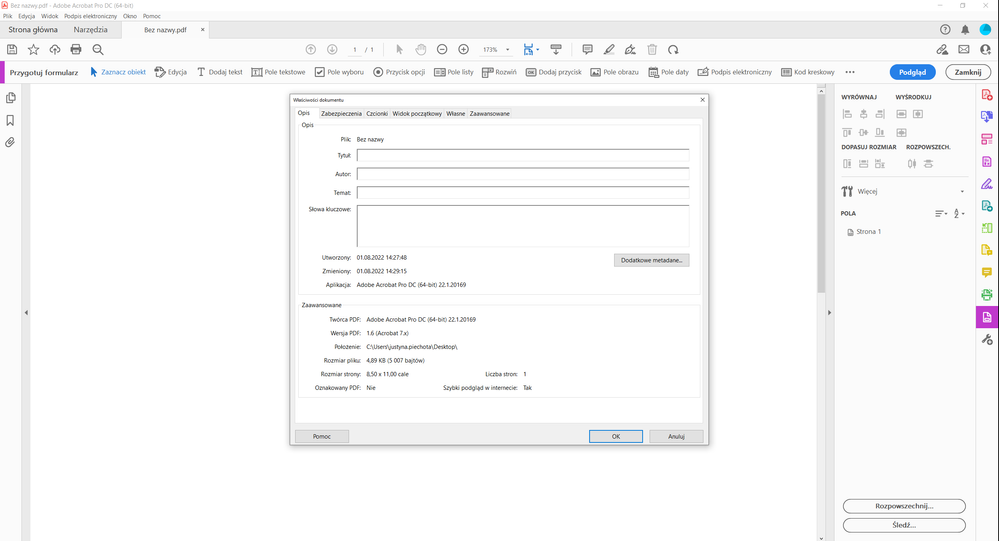
Please answer: what app are you using to show and check the form. I know what you have installed, but that doesn't mean you are using it to view the file. Perhaps a screen shot of the whole window showing the PDF open, window header and such, if you are not sure.

Translate
Report
Community guidelines
Be kind and respectful, give credit to the original source of content, and search for duplicates before posting. Learn more
community guidelines
New Here ,
Aug 01, 2022 Aug 01, 2022

screenshot 1.png

Translate
Report
Community guidelines
Be kind and respectful, give credit to the original source of content, and search for duplicates before posting. Learn more
community guidelines
Community Expert ,
Aug 01, 2022 Aug 01, 2022

Use the english UI of Acrobat and the date picker will work.

Translate
Report
Community guidelines
Be kind and respectful, give credit to the original source of content, and search for duplicates before posting. Learn more
community guidelines
New Here ,
Aug 01, 2022 Aug 01, 2022

I will try but it is hard to believe that it isn't working because of my interface's language

Translate
Report
Community guidelines
Be kind and respectful, give credit to the original source of content, and search for duplicates before posting. Learn more
community guidelines
Community Expert ,
Aug 01, 2022 Aug 01, 2022

The date picker will not work on Adobe Sign forms. Use a Acrobat form.

Translate
Report
Community guidelines
Be kind and respectful, give credit to the original source of content, and search for duplicates before posting. Learn more
community guidelines
New Here ,
Aug 01, 2022 Aug 01, 2022

But how to change it? is it different app or  I must just change settings ?

Translate
Report
Community guidelines
Be kind and respectful, give credit to the original source of content, and search for duplicates before posting. Learn more
community guidelines
Community Expert ,
Aug 01, 2022 Aug 01, 2022

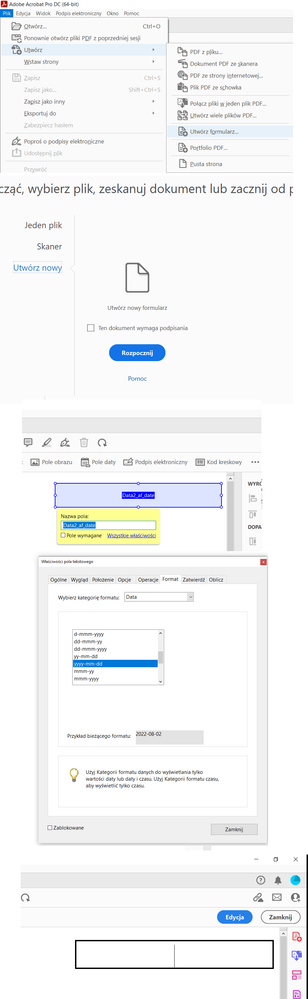
How have you created the form?

Translate
Report
Community guidelines
Be kind and respectful, give credit to the original source of content, and search for duplicates before posting. Learn more
community guidelines
New Here ,
Aug 01, 2022 Aug 01, 2022

screeeny.png

and it is Acrobat Form not Sign


Translate
Report
Community guidelines
Be kind and respectful, give credit to the original source of content, and search for duplicates before posting. Learn more
community guidelines
Community Expert ,
Aug 01, 2022 Aug 01, 2022

Go to Tools - Prepare Form, then click on More and Revert to Acrobat Form.

Translate
Report
Community guidelines
Be kind and respectful, give credit to the original source of content, and search for duplicates before posting. Learn more
community guidelines
New Here ,
Aug 01, 2022 Aug 01, 2022

I've checked it, and my file is Acrobat Form

Translate
Report
Community guidelines
Be kind and respectful, give credit to the original source of content, and search for duplicates before posting. Learn more
community guidelines
Community Expert ,
Aug 01, 2022 Aug 01, 2022

Can you share it with us, please?

Translate
Report
Community guidelines
Be kind and respectful, give credit to the original source of content, and search for duplicates before posting. Learn more
community guidelines
New Here ,
Aug 02, 2022 Aug 02, 2022

OK. it has only date file, and nothing more.

Translate
Report
Community guidelines
Be kind and respectful, give credit to the original source of content, and search for duplicates before posting. Learn more
community guidelines
Community Expert ,
Aug 02, 2022 Aug 02, 2022

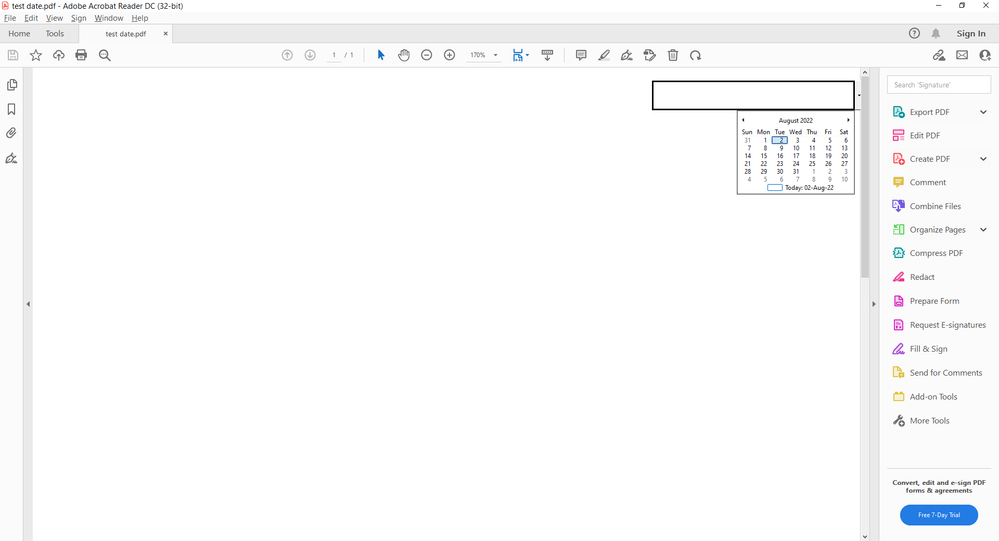
Works fine for me:


try67_0-1659424171966.png


However, the arrow to open the date picker is almost not visible, because the field is at the edge of the page. If you resize or move it a bit to the left it will be more evident.

Translate
Report
Community guidelines
Be kind and respectful, give credit to the original source of content, and search for duplicates before posting. Learn more
community guidelines
New Here ,
Aug 02, 2022 Aug 02, 2022

but I can't see the arrow at all 296561587_3071435613168185_6232026445951904708_n.jpg

Translate
Report
Community guidelines
Be kind and respectful, give credit to the original source of content, and search for duplicates before posting. Learn more
community guidelines
Community Expert ,
Aug 02, 2022 Aug 02, 2022

Don't know what to tell you... Try running a Repair Installation on the application (via the Help menu).

Translate
Report
Community guidelines
Be kind and respectful, give credit to the original source of content, and search for duplicates before posting. Learn more
community guidelines
New Here ,
Aug 02, 2022 Aug 02, 2022

I did it and it changed nothing 😞 . Someone said it may be problem wit my interface language, but  it would be really strange (and I can't change, it will be used by people who have Polish version of Adobe Reader, so changing it on my PC is useless)

Translate
Report
Community guidelines
Be kind and respectful, give credit to the original source of content, and search for duplicates before posting. Learn more
community guidelines
Community Expert ,
Aug 02, 2022 Aug 02, 2022

The date picker is not available in the Polish version.

Translate
Report
Community guidelines
Be kind and respectful, give credit to the original source of content, and search for duplicates before posting. Learn more
community guidelines
New Here ,
Aug 02, 2022 Aug 02, 2022

I wanted to try it, but it seems that if I change language, I will do it for all my apps, ...and the form I am making will be used on PC that have Polish version of Adobe Reader so changing it on my computer is useless. It is little strange that language of the menu is stopping it from working. 😞  But thank you for all your help anyway ❤️ .

Translate
Report
Community guidelines
Be kind and respectful, give credit to the original source of content, and search for duplicates before posting. Learn more
community guidelines
Community Expert ,
Aug 02, 2022 Aug 02, 2022

You should be able to change the language of just Acrobat, via Edit - Preferences - Language - Application Language. If English is not available there then you'll need to reinstall it using the English installer.

Translate
Report
Community guidelines
Be kind and respectful, give credit to the original source of content, and search for duplicates before posting. Learn more
community guidelines
LEGEND ,
Aug 02, 2022 Aug 02, 2022

Yes, it is the language. Hard to believe I know, that Adobe should do four languages and then stop. 

Translate
Report
Community guidelines
Be kind and respectful, give credit to the original source of content, and search for duplicates before posting. Learn more
community guidelines
Community Expert ,
Aug 02, 2022 Aug 02, 2022

Well, it's not like they're a multi-billion dollar company that can afford to localize its software for its users... </s>

Translate
Report
Community guidelines
Be kind and respectful, give credit to the original source of content, and search for duplicates before posting. Learn more
community guidelines
New Here ,
Nov 14, 2022 Nov 14, 2022

I've clicked on "Prepare Form" and the only "more" I see is the hammer and wrench, and there is no option to convert my document to any other format

Translate
Report
Community guidelines
Be kind and respectful, give credit to the original source of content, and search for duplicates before posting. Learn more
community guidelines