
MrBiltong
Known Participant
November 17, 2020
Question

Date format fails when "Request Signatures" is activated

  • November 17, 2020
  • 1 reply
  • 852 views

I have a PDF FROM that I am trying to Request Signatures.


The Date Format is DD-MMM-YYYY this is correct in my country.

When I "Request Signatures" the validation tells me that the contents of the field are incorrect.


Yet they are correct??
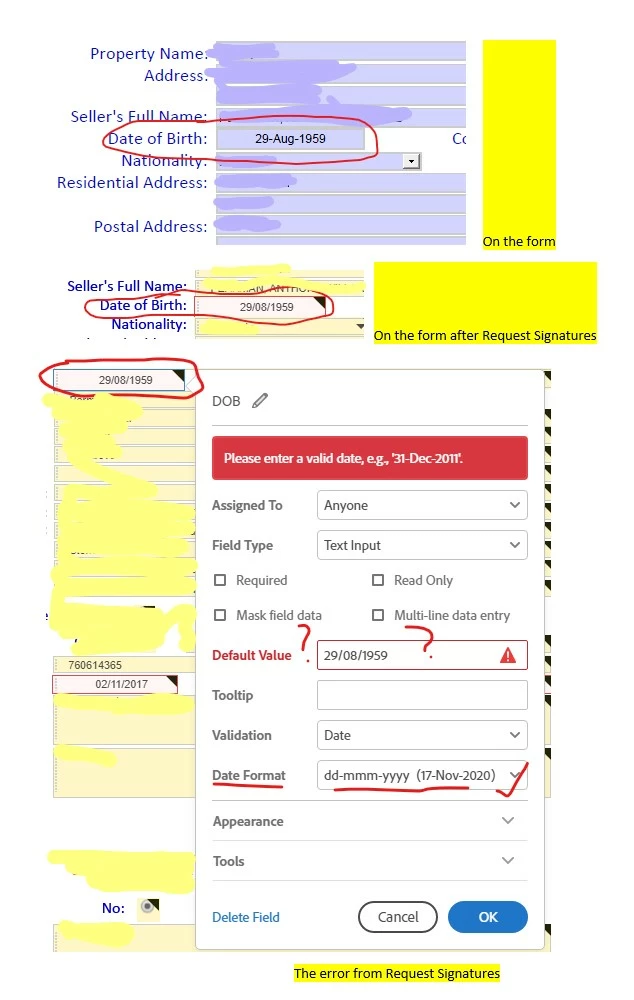
 

Any suggestions or solutions?

This topic has been closed for replies.

1 reply

ls_rbls
Community Expert
Community Expert
November 17, 2020

Is this happening with Adobe Sign?

Participant
November 17, 2020

No Acrobat - I don't have Adobe Sign


Bernd Alheit
Community Expert
Community Expert
November 25, 2020

It is Acrobat NOT Adobe Sign - I don't have Adobe Sign.


But the solution is as follows:

You can enter the date - by typing it in instead of selecting from the drop down.  Howeber if you type in 16/11/1948 - while the form will convert it to 16-Nov-2020 as that is the format.  BUT when you send the PDF for signature, the Signature side only uses the original entry '16/11/1948' and as this does not match the 'Format' an error is thrown up.

However if you select the date from the Drop Down Calendar no error is shown on Signature.


The reason for typing the date and not using the dropdown is that scrolling back to 1948 takes forever and therefore it is easier to just enter the date and allowing the Acrobat form format to do its work.


I think that this is something that Adobe PDF people should look at and fix!


You use Adobe Sign when you send for signing.