
Participant
June 27, 2016
Answered

Downloading Acrobat pro 11 with serial number

  • June 27, 2016
  • 1 reply
  • 86110 views

I am trying to download Adobe Acrobat pro  v 11.  The text indicates I will need the serial number (which I have), but when I click on Acrobat XI pro installer there is no place for me to enter the serial number, and I am not able to get beyond that step.
Correct answer Adorobat

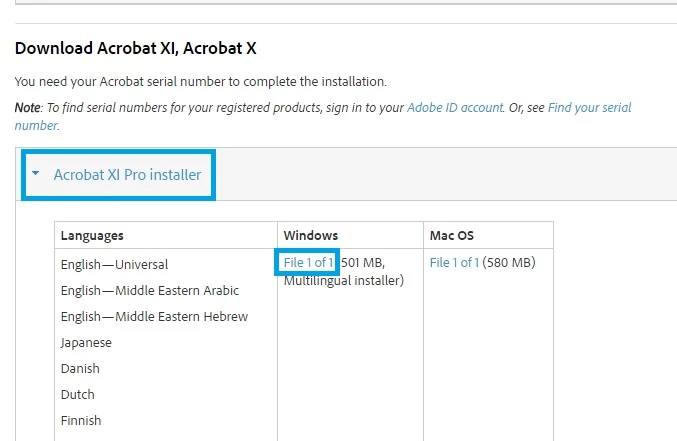
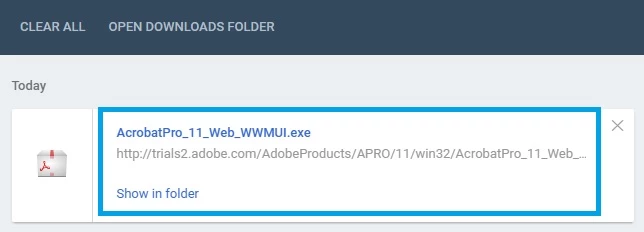
Click on Acrobat XI Pro Installer>select your operating system(Windows/Mac)>click File 1 of 1. It will begin download, when download finish ,press Windows+J key together on your keyboard to see the downloads, click on AcrobatPro .... .exe and begin the installation.

Below are the screenshots:

1 reply

Adorobat
Participating Frequently
June 27, 2016

Hi MrWillmuth ,

Could you please tell if you see any error message there?

Also try to download Acrobat Pro Xi from here:Download Pro or Standard versions of Acrobat DC, XI, or X

Thank You!

Shivam

Participant
June 27, 2016

When am on the Download Pro or Standard

<https://helpx.adobe.com/acrobat/kb/acrobat-downloads.html#download_11_10>versions

of Acrobat DC, XI, or X

<https://helpx.adobe.com/acrobat/kb/acrobat-downloads.html#download_11_10>

page,

and scroll down to where is says "Download acrobat X11, Acrobat X" there is

text that says I will need my serial number (which I have), but when I

click on Acrobat X11 pro installer, I only see columns labeled "languages"

" Windows" and "Mac Os", the is no place to enter my serial number. Please

help me get to the next step.

Participant
December 23, 2020

You're Welcome.


thanks