
Participating Frequently
December 31, 2024
Question

Drop down menu percentage calculation

  • December 31, 2024
  • 2 replies
  • 569 views

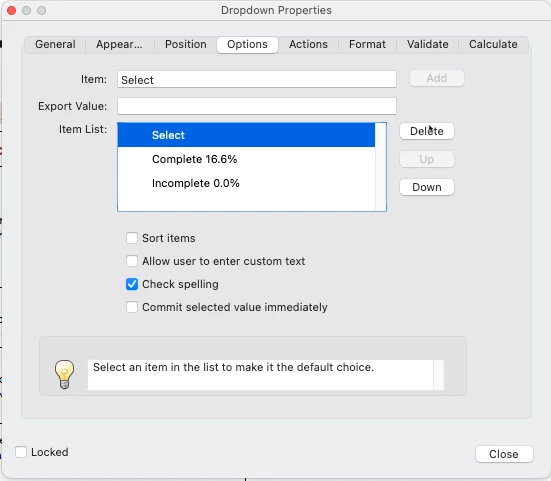
I tried looking at previous examples of this but my javascript is pretty limited so I'm still a little confused. I want to calculate specific fields for a cumulative value of 100%. For example 6 fields at roughly 16.6%. I want to execute this via a drop down menu and have it populated cumulatively as each of the 6 fields is selected...so if only one field is selected, the cumulative value would be only 16.6%, if two fields, then it would be 2x16.6% etc. I attached an image of how each of the six fields would be setup.
2 replies

PDF Automation Station
Community Expert
Community Expert
December 31, 2024

Your question is very confusing.  Where does the result go?  In a text field?  Is it 6 separate dropdowns like the one pictured that feeds the result?

semaj2024Author
Participating Frequently
December 31, 2024

Thanks for quick response; so yes, it is 6 seperate dropdowns that feed the result. And the result is a seperate text field under the category "% complete". I want the result text field to accumulatively calculate each one of the dropdowns as they are completed. 

PDF Automation Station
Community Expert
Community Expert
December 31, 2024

Use @Thom Parker 's solution.  You can leave "Select" if you want but make that 0 export value as well.  Also, check "Commit selected value immediately" in the options tab of the dropdowns so the results will appear as soon as a selection is made instead of on a blur event (leaving the field).

Thom Parker
Community Expert
Community Expert
December 31, 2024

Don't use JavaScript. Do this instead:

1) Include export values for each of the dropdown entries.

     a) 0 for "incomplete"

     b) 16.6 for "complete". 

     c) Don't use "Select", delete it, and make "incomplete" the default. 

2) for the result field, use the built-in Sum calculation. 


Thom Parker - Software Developer at PDFScriptingUse the Acrobat JavaScript Reference early and often
semaj2024Author
Participating Frequently
December 31, 2024

Thanks Thom for the quick response; I will give this a try!

semaj2024Author
Participating Frequently
January 1, 2025

Change the export value to 0.166


Awesome! Happy New Year!