
Participating Frequently
September 5, 2018
Answered

Duplicated text when file is returned after signature.

  • September 5, 2018
  • 6 replies
  • 6138 views

Hello,

This is a difficult issue to describe because it changes depending on what OS/Adobe Product combination you use to open the file.

We have a PMR form. someone gets the form and fills it out. It has text fields and table that auto calculates totals. It also has signature fields for digital signatures.

After the form is filled and signed and comes back in email from being signed it will present what appears to be copies of the text in the form area with smaller underlying text and causes a scrambled look.
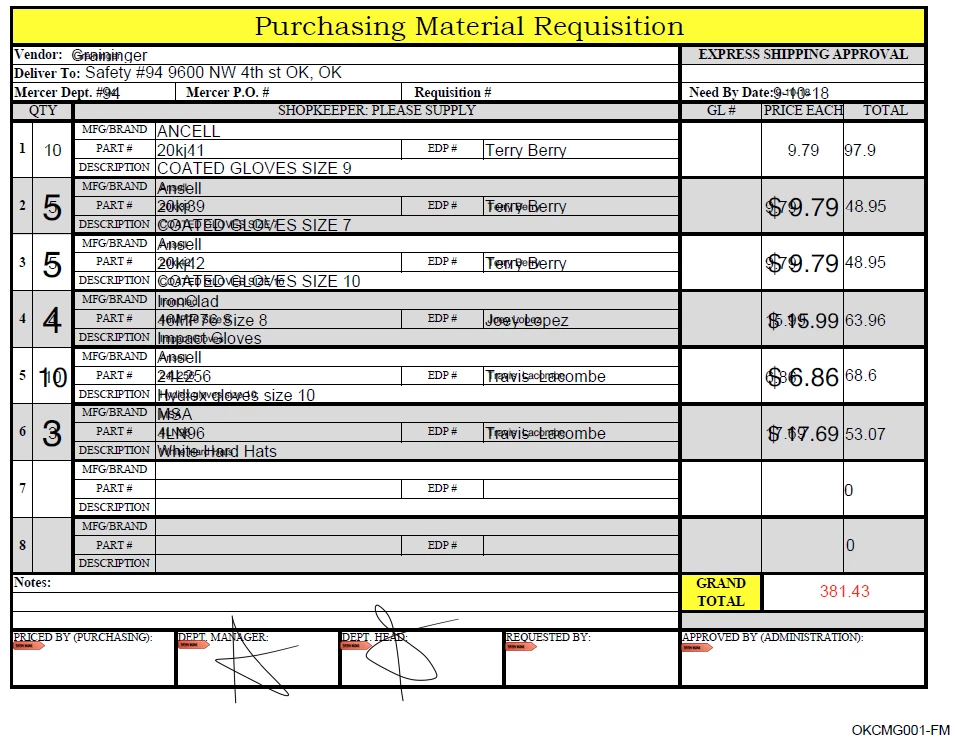
I would appreciate ideas on the cause of this.

Thank you.

Correct answer travis_9501

I had this happen again today - There is an easy workaround.

Step 1 - Open the PDF document you are having the issue within Google Chrome, using it's inbuilt reader. You should find the document looks great in there.

Step 2 - Using Chrome's inbuilt option in the broswer,  select "Print to PDF". It will open it as a PDF and you can "save" this new file as a PDF locally on your machine.


That's it, you'll find it opens perfectly after that.

6 replies

travis_9501Correct answer
Participant
September 23, 2024

I had this happen again today - There is an easy workaround.

Step 1 - Open the PDF document you are having the issue within Google Chrome, using it's inbuilt reader. You should find the document looks great in there.

Step 2 - Using Chrome's inbuilt option in the broswer,  select "Print to PDF". It will open it as a PDF and you can "save" this new file as a PDF locally on your machine.


That's it, you'll find it opens perfectly after that.

S_S
Community Manager
Community Manager
February 10, 2025

Hi @travis_9501,


Hope you are doing well. 


Thanks for writing about what worked for you. 

Marking this as a correct answer for future users to use as a reference.


-Souvik

Legend
September 5, 2018

I would test that thoroughly yourself, rather than ask them to do something that might not work. The mobile apps are very limited, and you can never assume they can do the same things, or do them as well, as the desktop ones.

Participating Frequently
September 5, 2018

Thank you TSN.

Inspiring
September 5, 2018

It would be helpful to be able to examine the original blank form. Are you able to post it somewhere so we can take a look?

Participating Frequently
September 5, 2018

Here is a link to download from Google Drive

PMR-Form.pdf - Google Drive

Thank you.

Inspiring
September 5, 2018

The blank form looks fine. You'll notice that on some of the numeric fields that the formatting isn't applied (e.g., instead if $97.90, it shows 97.9). This type of formatting is done with JavaScript, which leads me to believe that something other than Acrobat/Reader was used, or perhaps someone had JavaScript disabled. I can't explain the double appearances without a sample filled-in form that exhibits this behavior.

Legend
September 5, 2018

No, the extension has no effect on display. As I said, no Adobe technology is involved. At one time there was an Adobe browser extension to show PDF files. Google blocked it, and it can no longer be used. The Chrome Acrobat extension is for PDF creation only.

I probably missed it, but I couldn't find in your description a case where Adobe software was showing the file incorrectly. Only Google software.

Participating Frequently
September 5, 2018

The original post and image are what it looks like in Adobe Std X, Adobe Reader DC after getting signatures and coming back in an email.

Legend
September 5, 2018

Ok, let's focus on the display in Reader DC, as it's the most up to date. You are seeing, by the looks of it, fields filled in twice in two different fonts at the same time. I think that's what I'm seeing. Since you are seeing it in two different company's viewers (so Chrome is useful here) I think we can assume the PDF really has been messed up by something.

So, let's take a step back to how it was signed. Exactly how was this done, with what software?

Legend
September 5, 2018

If you're opening it in Chrome you are not using any Adobe technology. Any weird things on screen should be reported to Google, who make Chome and its PDF viewer.

Participating Frequently
September 5, 2018

The issue is in the Adobe products. Acrobat and Reader. I bring up Chrome because I had originally thought that opening it in a browser would be a work around for the person but then found that after saving the file in Acrobat 9 it exhibited the issue even opening in chrome.

If no Adobe product is involved when opening in Chrome then why does Adobe provide a browser extension? I do know that Chrome will display a PDF without the extension but when the extension is installed and enabled then it would affect the display of a PDF, No?

Thank you.

Legend
September 5, 2018

What EXACT software does the client use to fill and sign the form? Including version. Note the actual software being used; don't assume that just because Acrobat Reader is installed that it is the software actually used at any point.

Participating Frequently
September 5, 2018

We have had the issue in Adobe Acrobat X, Adobe Reader DC but if I opened in Chrome on my Windows 10 computer that has Adobe reader extension 15.1.0.6 it does not have issue BUT when I saved the file (on a different machine Win7) in Acrobat 9 (where it didn't show the issue) and then open the same file on my Windows 10 in Chrome, it shows the issue.

My computer = Windows 10, Adobe Reader DC version 18.011.20058.33888, Chrome v66.0.3359 Adobe extension 15.1.0.6

Other computer = Windows 7, Adobe Acrobat Std 9.0, Adobe Reader DC 2017.012.20098, Chrome 68.0.3440.106

Original reporting machine is Windows 7 with Adobe Acrobat Std X and Adobe Reader DC (don't have specific version info).

Above computer displays properly until after I save in Acrobat 9, then open in Chrome. In Chrome it shows the double text but still shows normal in Adobe; But if I move the file and open on my Windows 10 machine it shows doubled text even in Chrome (previously normal).