

jsl01
Inspiring
September 9, 2018
Answered

Edit Paid or Received info

  • September 9, 2018
  • 1 reply
  • 1722 views

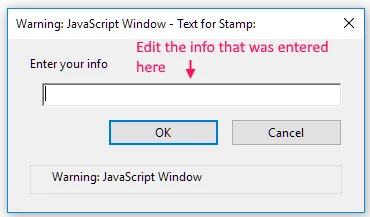
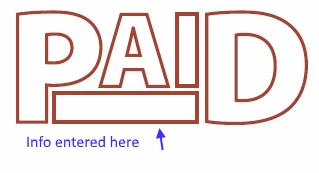
If you add a Paid or Received stamp to your PDF  where you can add your own info but you

realize that you made a mistake and need to edit the info, how do you do it?

If I delete the stamp and want to add a new one the info is still in the stamp. I can not

edit it.

If I remove it and close the PDF and try again for some reason it remembers what was in the filed.

I can get around this problem.

Any help would be appreciated.

Thanks

Windows Pro 10

Acrobat Standard 2017 Classic

If this is wrong community please move to the correct one.
This topic has been closed for replies.
Correct answer gkaiseril

OK.

Thanks

I will try to do a repair or do a clean re-installation of Acrobat and see what happens.

Thanks again.

See Update: Dynamic Paid and Received Stamps from Acrolaw blog for updated stamps. depending upon how you moved the stamps or changes to the way Acrobat works internally, the script could have been corrupted.

1 reply

Bernd Alheit
Community Expert
Community Expert
September 9, 2018

Did you create a dynamic stamp?

jsl01
jsl01Author
Inspiring
September 9, 2018

No.

They were a part of the Acrobat instillation.

gkaiserilCorrect answer
Inspiring
September 10, 2018

OK.

Thanks

I will try to do a repair or do a clean re-installation of Acrobat and see what happens.

Thanks again.

See Update: Dynamic Paid and Received Stamps from Acrolaw blog for updated stamps. depending upon how you moved the stamps or changes to the way Acrobat works internally, the script could have been corrupted.