
Participant
February 16, 2024
Answered

Editing tools, latest update overall very frustrating

  • February 16, 2024
  • 1 reply
  • 678 views

I'm not sure who the focus groups are or what the thought process was behind the latest version of Acrobat Pro (v 2023), but I really wish you guys had left Acrobat the way it was. The previous version worked fine, I knew where all the tools were, and they worked properly without extra clicking/dropdowns, etc.


With v 2023, I can't remember where the editing tools are, the comments/notes won't pop up (open) when I need them to... I can't open a new PDF in its own window.... Please, please, please, go back to the previous version. It was user friendly, the tools worked properly and I could easily find the "Edit Pages", "Organize Pages", etc. I've used Acrobat Pro for YEARS and I've never been this frustrated with a software program like I am now. 


Thank you in advance for considering the points I've expressed above.
This topic has been closed for replies.
Correct answer littlelight29

Hello ,

You can try this

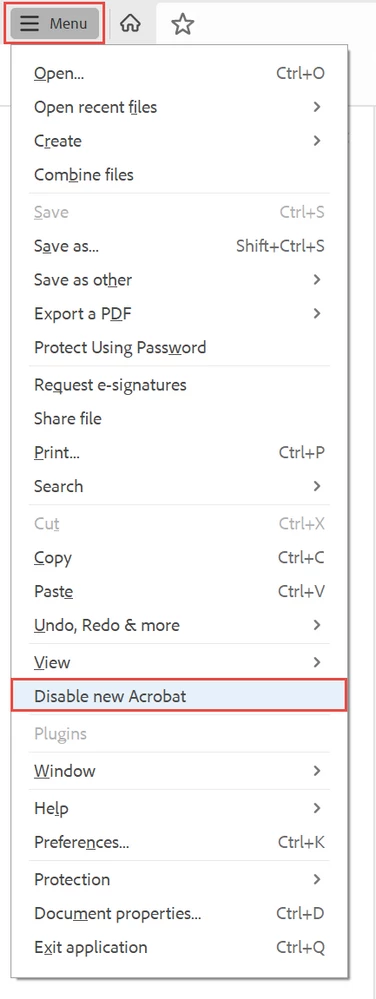
Click on the "hamburger menu" in the upper left corner (the 3 horizontal bars where the old "File" menu used to be),  Select Disable New Acrobat.

Hope it will help you!


1 reply

littlelight29Correct answer
Participant
February 16, 2024

Hello ,

You can try this

Click on the "hamburger menu" in the upper left corner (the 3 horizontal bars where the old "File" menu used to be),  Select Disable New Acrobat.

Hope it will help you!


Gayle_AQAuthor
Participant
May 10, 2024

Thank you, @littlelight29 

This worked for me. Now I can use the version I was used to! I'd still love it if Adobe would give us the option to have new PDFs open in their own window. 

Gayle_AQAuthor
Participant
May 10, 2024

UPDATE: That worked for me the last time. Looks like they've moved it since you replied with your solution. I found it under the View Menu (I don't have the hamburger menu anymore in my Acrobat - on mac).