
Inspiring
August 14, 2019
Question

Embedded font error opening PDF

  • August 14, 2019
  • 12 replies
  • 15282 views

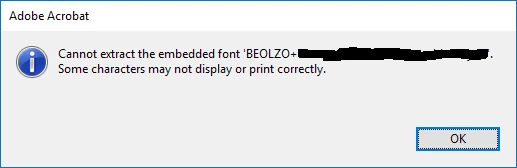
I get the attached embedded font extraction error opening PDF documents. I have Acrobat DC 2019-012-20036. This error just started yesterday, apparently coinciding with this update. All files I've tried so far were generated in MadCap Flare with fonts embedded. Files I could view prior to this update now generate this error. So do newly generated files. My colleagues with Reader can view the files without this error (but I don't know their Reader versions). The font is a company-specific font which had no issues prior to yesterday. I did the usual reboot, reinstall Acrobat and the font. No luck.
This topic has been closed for replies.

12 replies

EmmDjee
New Participant
August 20, 2019

Hi!

I can confirm the problem with my MadCap PDFs, however here using Acrobat 2017 Pro (running under Windows 10 64-Bit). The problem occurs with version 2017.011.30144. On previous versions everything is fine, thus I've uninstalled Acrobat and reinstalled it with the update 30143 (lucky me, still having this one).

Vinod Dobhal already got a link from me. Hopefully, there will be enough input for him to check. Thanks for taking care (even if this is a problem not initiated by Adobe alone - as many problems in this world they are an accumulation of several incidences).

Docguy
Participating Frequently
August 16, 2019

It is also not feasible for us to re-produce every PDF we've generated for the last 3+ years and try to distribute them to customers. This is not a solution that will work for us.

I am also not able to find the referenced profile "Fix potential font problems". Even if I could, again, I can't do this for all the PDFs we've been sending customers for years. We need an immediate solution.

As you can see from other posts in these forums, this is not just a MadCap Flare issue. There are several other people who have created PDFs using other tools that are reporting the problem.

For now, I've instructed our customer support team to tell customers to open PDFs in Chrome or Edge, as those will open the PDFs correctly.

When I contacted chat support at Adobe, I was told that Acrobat doesn't support third-party fonts. I was told to purchase Typekit to solve my issues with generating PDFs. Again, not going to re-generate years worth of PDFs and distribute to customers.

Dov Isaacs
Brainiac
August 16, 2019

docguy  wrote

… When I contacted chat support at Adobe, I was told that Acrobat doesn't support third-party fonts. I was told to purchase Typekit to solve my issues with generating PDFs. Again, not going to re-generate years worth of PDFs and distribute to customers.

Unfortunately, that “chat person” didn't know what s/ he is talking about.

(1)     The problem has absolutely nothing to do with what font you are using in Madcap software. The problem will also occur using fonts directly from Adobe. It has to do with how the Madcap software embeds the font.

(2)     Typekit is now Adobe Fonts. Per (1) above, fonts from that source will not solve the problem. And by the way, you can't buy just a subscription to Adobe Fonts. It is part of the Creative Cloud and Document Cloud offerings.

(3)     No one in their right mind is expecting you or anyone else to regenerate any PDF files. As indicated by my previous post, Acrobat Engineering is quite aware of the problem and is working on it.

          - Dov

- Dov Isaacs, former Adobe Principal Scientist (April 30, 1990 - May 30, 2021)
New Participant
August 18, 2019

Hi All,

We are working on the fix for the font issue and require as many PDF files having font issues to test it out. Request anyone having the issue to inbox me the PDF files.

Thanks,

Vinod


How would you like to be inboxed?

N J A
Participating Frequently
August 15, 2019

The recent Acrobat update to 2019.012.20036 means our team cannot output any usable PDFs from Madcap Flare. Similarly, PDFs built using Flare before the Acrobat update cannot be opened either. This is an extremely serious issue, which must be fixed in hours, not days or weeks!

New Participant
August 15, 2019

In case it's relevant, I'm having the same issue, but I've noticed that it's only Acrobat DC and Acrobat Reader that produce the error. I can view the PDFs fine using other PDF viewers (ie embedded in Slack or in Chrome).

In other words, we might still be able to produce PDFs, we just can't view them in the latest Acrobat.

New Participant
August 15, 2019

I am also experiencing the same font extraction error opening PDF documents that were generated in MadCap Flare in Adobe Acrobat Pro DC. It looks like the update to version 2019.012.20036 caused this issue. I hope this issue can be resolved soon.

AnandSri
Community Manager
Community Manager
August 15, 2019

Hi Marks,

We're sorry for the trouble you had, a similar issue was reported, and the issue was fixed by reformatting the font file in the application generating the PDF files, try reformatting the font file in MadCap Flare and see if that helps.

Let us know how it goes and share your observation.

Thanks,

Anand Sri.

Inspiring
August 15, 2019

I am not sure what "reformatting the font file" in Flare means. I deleted and reinstalled the fonts and this did not change.

The problem with this is that every document I've produced would have to be regenerated and redistributed to my customer base and this is not practical.

Documents that displayed fine last week no longer display properly.

AnandSri
Community Manager
Community Manager
August 15, 2019

Thank you Mark for sharing the details, would it be possible to share a sample PDF file which is throwing the error message with us so that we can test it at our end?

Please share the file in private message only, to send the private message, please take help from the article How Do I Send  Private Message | Adobe Community

Thanks,

Anand Sri.

ls_rbls
Community Expert
August 15, 2019

Please excuse my typos.

I wrote this in a hurry while at work so apologies for that

ls_rbls
Community Expert
August 15, 2019

Correction,

By Java plugins I meant the Java Runtime Environment installed on Windows

ls_rbls
Community Expert
August 15, 2019

See if by unchecking use system font in Adobe General Preferences would do any difference.

You may also want to dig more if with windows 10 being an 64 bit operating systems the java plugins version installed in your computer also updated to 64bits f4om the 42bit version.

I had an similar  issue in my windows 10  similar to yours; i updated to 64bit version of the java plugins, but nothing of what I was trying to work with was working after that particular update except when I rolled back and installed the 32bit version of the java plugin ; and it resolved my issue.

Maybe this will give you additional insights

ls_rbls
Community Expert
August 15, 2019

Is that a windows 7 computer you are using?

Inspiring
August 15, 2019

it is Windows 10 64 bit. Same Windows update version today as it was at the beginning of the week when this worked.

I noticed in another thread this is now happening to some Reader users as well. Adobe needs a patch quickly.

Inspiring
August 15, 2019

It is a shame that Adobe does not have a process to roll back an update that introduced a problem, at least no way that I can see to go back to the version that existed 8/12 on my PC.