
Exit
  • Global community
    • Language:
      • Deutsch
      • English
      • Español
      • Français
      • Português
  • 日本語コミュニティ
  • 한국 커뮤니티
1

Enable Multiple Page Selection - Organize Pages toolbar

Community Beginner ,
Mar 14, 2018 Mar 14, 2018

My co-worker has this option at the bottom of the screen when she opens the Organize Pages toolbar in Adobe Acrobat Pro DC.  We have the same version of Adobe (2015.006.30417).  How do I enable this in my Adobe.
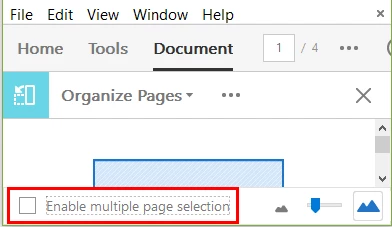
Thanks for your help!!

TOPICS
Edit and convert PDFs
4.8K
Translate
Report
Community guidelines
Be kind and respectful, give credit to the original source of content, and search for duplicates before posting. Learn more
community guidelines
1 ACCEPTED SOLUTION
Community Expert ,
Mar 15, 2018 Mar 15, 2018

In the preferences of Acrobat under "General" activate the touch mode.

View solution in original post

Translate
Report
Community guidelines
Be kind and respectful, give credit to the original source of content, and search for duplicates before posting. Learn more
community guidelines
Community Expert ,
Mar 15, 2018 Mar 15, 2018

In the preferences of Acrobat under "General" activate the touch mode.

Translate
Report
Community guidelines
Be kind and respectful, give credit to the original source of content, and search for duplicates before posting. Learn more
community guidelines
Community Beginner ,
Mar 15, 2018 Mar 15, 2018

Thank you!!!!

Translate
Report
Community guidelines
Be kind and respectful, give credit to the original source of content, and search for duplicates before posting. Learn more
community guidelines
New Here ,
Mar 27, 2018 Mar 27, 2018

Is there a way to "permanently" check this box, and only uncheck it in the event you do not want to enable multiple page selection?

Translate
Report
Community guidelines
Be kind and respectful, give credit to the original source of content, and search for duplicates before posting. Learn more
community guidelines
Adobe Employee ,
Apr 26, 2018 Apr 26, 2018

Hello Ashleyg,

Sorry for the delayed response and inconvenience caused. You can choose Touch Mode option as Always in Edit>Preferences>General.

Feel free to update this discussion for any further assistance.


Regards,Anand Sri.

Translate
Report
Community guidelines
Be kind and respectful, give credit to the original source of content, and search for duplicates before posting. Learn more
community guidelines
Community Beginner ,
Sep 18, 2018 Sep 18, 2018

Enabling Touch Mode is set on my one pc to Auto-Detect and Works, but on most other computers in our training room it does not. Using Adobe Pro 2017. I also changed it to Always and also restarted Adobe and not working. Any other options. Users want this feature, especially in my training room! Same image and versions.

Translate
Report
Community guidelines
Be kind and respectful, give credit to the original source of content, and search for duplicates before posting. Learn more
community guidelines
Adobe Employee ,
Sep 20, 2018 Sep 20, 2018
LATEST

Hello DianeMcCull,

Make sure you have the latest version of Acrobat 2015.006.30452 installed on the machines. Check for the updates from help>check for updates, or install it manually from 15.006.30452 Out of cycle update, September 19, 2018 — Release Notes for Acrobat DC Products

Also, make sure you have all the updates of the OS installed including the graphics driver and touch mode.

let us know how it goes with the latest version.

Thanks,

Anand Sri.

Translate
Report
Community guidelines
Be kind and respectful, give credit to the original source of content, and search for duplicates before posting. Learn more
community guidelines