

Error 1920.Service Print Spooler- Acrobat uninstall/install problem; solution is here!
Attempt to update Acrobat gave this error message-
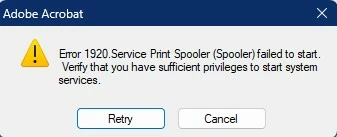
Multiple attempts still resulted in failure. Tried to first re-install Acrobat, but failure. Used AdobeAcroCleaner_DC2021, which finished but did not fix problem. Tried Win 11 Uninstall Troubleshooter Tool, which finished but did not fix problem. Multiple reboots. Tried to re-install via Cloud for Desktop, but failed to complete. Now I'm out of ideas, and would value any this community might have. tyia
UPDATE: I tried repairing the Cloud for Desktop application, which completed. Then tried to install Acrobat from that app. Failed, but led me to a different potential solution as per these screenshots... which also failed, same error message as I started with (Screenshots 37-40). As it's now Monday I'm reaching out to Adobe for technical support.
UPDATE 2: Before contacting Support I had another option to fix, which failed but did yield another set of screenshots (41-46).
UPDATE 3 (should be Final): Adobe Support took over my computer. Ultimately, problem was that the Print Spooler in Task Scheduler was disabled. I was told this is a Windows issue. Anyway, re-starting the Spooler allowed the installation to proceed normally. QED


 AdChoices