
Error and black Screen Freeze Issue when Viewing PDF in Adobe Acrobat Reader
OS : Windows 11 24H2
Adobe Verison : Latest version
I am currently using Adobe Acrobat Reader, and when trying to open a specific PDF file, I encounter the following error message:
"There is an error on this page. Acrobat may not be able to display the page correctly. Please contact the PDF creator to resolve the issue."
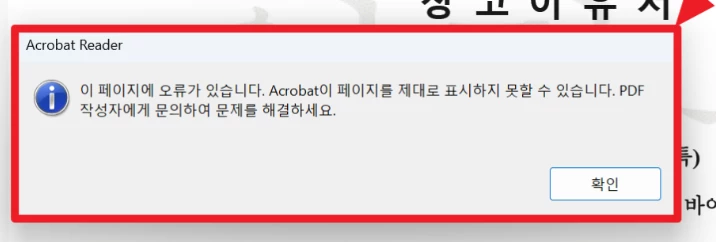
After this error message appears, the screen turns black after some time, and eventually, the PC becomes unresponsive.
Upon testing, I found that when the "Smooth Text" rendering option is set to 'None', the issue does not occur. However, this may be a temporary workaround, and further investigation is still ongoing.
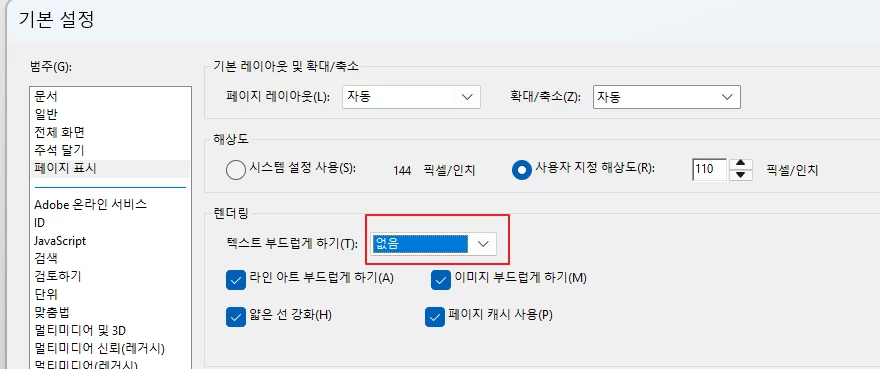
Additionally, the phrase "There is an error on this page" is a direct translation, and there may be different interpretations of it. Please take that into consideration.
For reference, when opening the same PDF file in Chrome browser, this issue does not occur.
I would appreciate any insights on why this issue is happening and if there is a solution to resolve it.
Thank you.
 AdChoices