
New Participant
August 17, 2017
Answered

Error message 1310 Adobe Acrobat 9.0 on Windows 10

  • August 17, 2017
  • 2 replies
  • 1767 views

I am trying to install Acrobat Professional 9.0 from a CD on my Windows 10 Operating System.

Just received a new serial number yesterday.

It runs up to about 99% then I receive an error message:
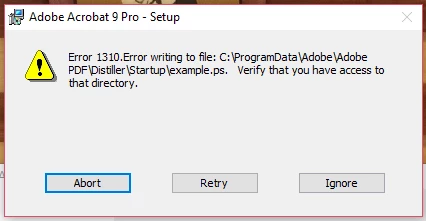
I tried to download a version online and install it and I received the same error message.

What can I do to correct this error?

This topic has been closed for replies.
Correct answer deannaw58993539

Yes, you are correct. You may try installing Acrobat 9 on your machine, it may or may not work as you mentioned there is a compatibility issue between Acrobat 9 and Windows 10. The above issue you have posted a screenshot of indicates there is an issue while accessing the directory. You may try the steps suggested in the above link which addresses this issue.

-Shivam


I used the instructions from this link: Error 1310. Unable to update / repair / install

It worked! Changed the ActiveX to AAA and used the administrator name for my laptop and no company name.

So, Acrobat 9.0 can be installed on a computer using Windows 10 operating system, you just need to know the work around.

2 replies

Adorobat
Community Manager
Community Manager
August 18, 2017

Hi Deannaw,

Based on the issue description mentioned above, you are receiving error 1310 when trying to install Acrobat 9 on your Windows 10 machine, is that correct?

Please refer to the steps suggested in the following links:

Error 1310. Unable to update / repair / install

Error 1310 installing Reader

Error 1310: "Error writing to file: C:Config.Msi..." | Adobe Creative Suite 4

Let us know how it goes.

Shivam

New Participant
August 18, 2017

I don't think these solutions apply to my problem.

I think the problem stems from the incompatibility of Acrobat Pro 9.0 and Windows 10 Operating System.

I need to know if there is a work around to allow me to install this program on my laptop that has Windows 10.

Adorobat
Community Manager
Community Manager
August 18, 2017

Yes, you are correct. You may try installing Acrobat 9 on your machine, it may or may not work as you mentioned there is a compatibility issue between Acrobat 9 and Windows 10. The above issue you have posted a screenshot of indicates there is an issue while accessing the directory. You may try the steps suggested in the above link which addresses this issue.

-Shivam

kglad
Community Expert
August 17, 2017
New Participant
August 17, 2017

Still looking for information pertaining to Acrobat Pro 9.0 installation on Windows 10 operating system.

Below is a picture of the error message that I get.