Participant
February 9, 2025
Answered

Error Message: Apple could not verify "doc.pdf" is free of malware that may harm your Mac or...

  • February 9, 2025
  • 5 replies
  • 14065 views

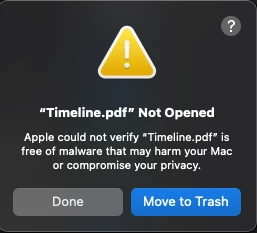
I recently installed creative cloud to my Mac and I am having issues opening PDFs in Acrobat. I'm getting the following error. Example: document named "Timeline.pdf"

"Apple could not verify "Timeline.pdf" is free of malware that may harm your Mac or compromise your privacy."

It gives me the option of clicking DONE or MOVE TO TRASH.

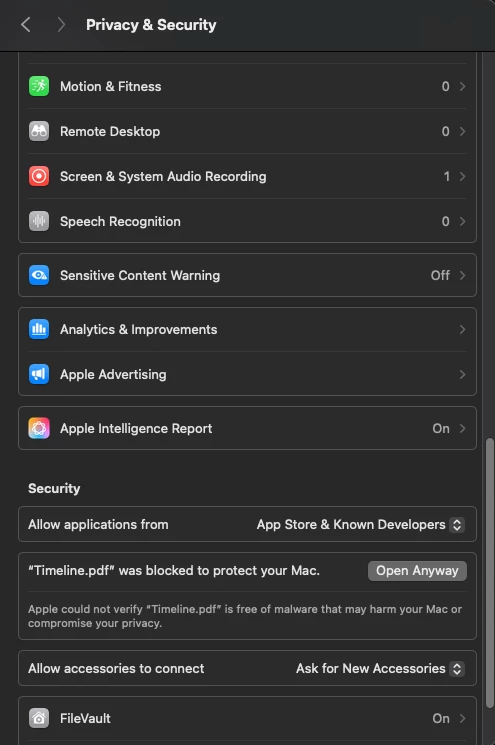
I googled and I found that if I go to privacy and security and click on "Open Anyway", it'll open the document in Acrobat. But I'm having to do this for every single document I try to open with Acrobat.

I tried deleting and re-installing creative cloud as well as acrobat, I tried restarting my Mac and I tried shutting down completely and starting the Mac again.

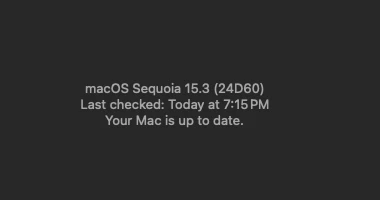
Can someone please help me? Below screenshots:

Correct answer Klick Digital Studio

Here's how to fix this issue. Right click on the pdf, and select 'Get Info'. The select 'Open with; Adobe Acrobat' and below that, select 'CHange all'. I believe the error is with Mac OS not wanting to open the pdf, unless it is with acrobat, so declares it an app, instead of a dile.

5 replies

Participant
May 12, 2025

I am having the same issue with other apps, exactly same, no malware. just wanting to to change JPEG app that it should open on in default. Same issue. Needs escalation in Apple Forums I beleive. 

Participant
April 23, 2025

I didn't see if you got an actual solution to this, but in your second screen shot, click OPEN ANYWAY. It will ask for your admin password if your account isn't an admin. Might ask even if you are. Just put in your password and it will allow it.


You will need to click DONE before open anyway will show up.

Participant
February 10, 2025

This happened to me today. I accidentally set acrobat as my default to open pdf files. I tried to "open with" preview but I kept getting this message. Wasnt sure how to change the default back and ended up having to reset the default app to open pdfs through a couple terminal commands. your case might be different so I don't want to tell you to open something that could have malware but in my case it was a file I have been opening for months. 

LA_1434Author
Participant
February 10, 2025

Hi @erik25 – thank you for your suggestion. I am 100% sure I dont have malwares as I haven't downloaded any softwares from third party websites.  Would you mind explaining how you reseted the default app to open pdfs through terminal commands?


Thanks,

Laura

Participant
February 19, 2025

I just got a new work comp today and am having the same issues. I will reach out once i find the issue. You do the same? haha

try67
Community Expert
Community Expert
February 10, 2025

This is not an Adobe issue. Try an Apple forum.

Participant
March 6, 2025

This issue occurs after opening a pdf in Adobe Acrobat and setting it to open with Acrobat as default. When you try to change the default app to the built in PDF preview app (MacOS), it gives an error, because the metadata has been changed by Acrobat. The pdf worked fine with the built in app until I opened it with Acrobat, after that it no longer wants to preview the file.

Participant
April 13, 2025

This is vile!! Were you able to fix it?

creative explorer
Community Expert
Community Expert
February 9, 2025

@LA_1434 it seems your anti-virus is working for you. I would defintely delete that and run a full malware virus check sooner than later. The next question is when you installed the creative cloud apps, are you using adobe.com to install or did you find the apps on a third party website. If it's a third party website, then strongly dis-engage and use official adobe websites. 

m
LA_1434Author
Participant
February 10, 2025

Hi @creative explorer - thank you for your kind message. My adobe account is actually a school account, so I downloaded creative cloud directly from adobe and the files I'm trying to open are basic pdfs from school, as well as pdfs from my printer scan. Also, my mac is new. I didn't have any issues with my old one though. 

creative explorer
Community Expert
Community Expert
February 10, 2025

If this is a school account.... you need to do what I do too... I am an instructor... when you log into your adobe.com,
don't enter your email address....according to my school IT Team...what they like to do is enter the last part of the email address without your name and @ ... for example, I teach at BCIT.


Once you do that, it should take you to school portal, and that's when you enter your school's email address and password, and any 2FA authentication  

m