aspenb62747085
Participant
July 26, 2018
Answered

Error when scanning with Brother ADS3600

  • July 26, 2018
  • 2 replies
  • 755 views

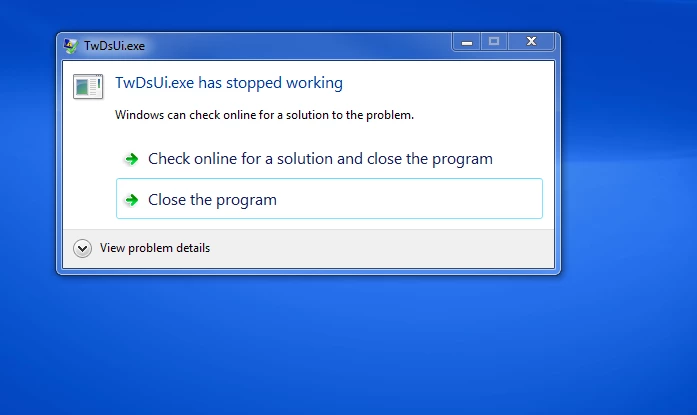
Has anyone ever gotten this error while trying to scan in Adobe? I have already contacted the manufacturer (Brother) but because the scanner works in all other programs we use it in, Brother is convinced this is an issue with the Adobe software and I should be contacting them. I cannot find an actual email to send them this error message, so I figured I would try here. If you have any solutions please feel free to share. Thank you

This topic has been closed for replies.
Correct answer gary_sc

I am talking a bit out of my league here as I am a Mac user and we have different issues when trying to scan from within Acrobat, BUT I have seen a number of thread where people describe the kind of scenario that you are having.

In general, there is an issue with the drivers and/or the Twain interface and you computer's operating system: they all have to be coordinated together with the latest updates. Unfortunately there is the risk that if you do one update and the other software items having got their update to work with the original update, you're back to where you are now.

Although it's great when it works, I have long ago given up on trying to scan from within Acrobat and have been scanning by my scanner's software and after that's completed, then I open the document(s) up in Acrobat for OCR processing. In the grand scheme of things, it takes no longer and can actually save a lot of time.

On a semi-related point, this may help you get better quality scans:

https://forums.adobe.com/community/creativepipeline/blog/2018/01/22/scanning-clean-search-able-pdfs

2 replies

gary_sc
Community Expert
gary_scCommunity ExpertCorrect answer
Community Expert
July 29, 2018

I am talking a bit out of my league here as I am a Mac user and we have different issues when trying to scan from within Acrobat, BUT I have seen a number of thread where people describe the kind of scenario that you are having.

In general, there is an issue with the drivers and/or the Twain interface and you computer's operating system: they all have to be coordinated together with the latest updates. Unfortunately there is the risk that if you do one update and the other software items having got their update to work with the original update, you're back to where you are now.

Although it's great when it works, I have long ago given up on trying to scan from within Acrobat and have been scanning by my scanner's software and after that's completed, then I open the document(s) up in Acrobat for OCR processing. In the grand scheme of things, it takes no longer and can actually save a lot of time.

On a semi-related point, this may help you get better quality scans:

https://forums.adobe.com/community/creativepipeline/blog/2018/01/22/scanning-clean-search-able-pdfs
Legend
July 26, 2018

Acrobat Reader can't scan.

aspenb62747085
Participant
July 26, 2018

It is not reader, It is the standard Pro DC. Sorry for the confusion.

jane-e
Community Expert
Community Expert
July 26, 2018

aspenb62747085 ,

Discussion moved from Acrobat Reader to Scanning & OCR