

bebarth
Community Expert
Community Expert
March 7, 2025
Question

event.commitKey values

  • March 7, 2025
  • 2 replies
  • 473 views

The commitKey property event is briefly documented in api reference and give the 4 values (0, 1, 2 or 3) that can be returned in accordance with the way the field loose focus.
https://opensource.adobe.com/dc-acrobat-sdk-docs/library/jsapiref/JS_API_AcroJS.html#commitkey
I personally always used this property in Custom format script as on the example of the api reference.

On the web, I found a file using commitKey in Validation script with a strange syntax:


if (event.commitKey=13…)
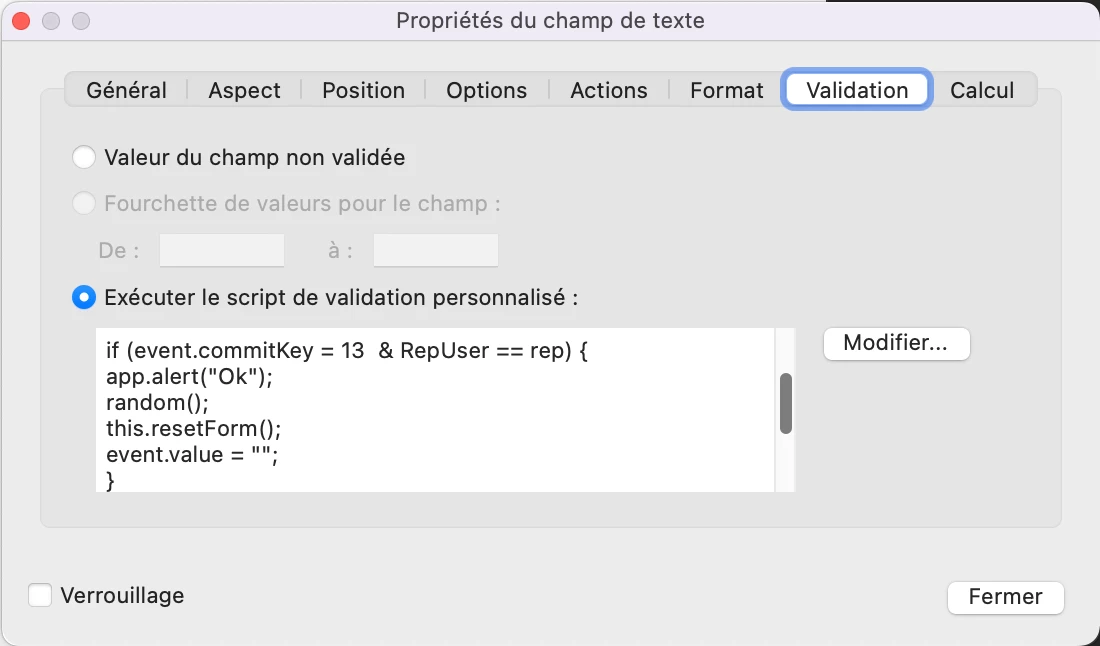
 

With a single “=” symbol and with 13 which seems to be the ascii character of the Carriage Return.
And that work!!!
I tried to change with "if (event.commitKey==2…)" and that doesn’t work anymore!
Does anyone have an explanation?
Is there a more detailed documentation for this property?
Thanks

2 replies

try67
Community Expert
Community Expert
March 7, 2025

Whoever wrote this code didn't know what they were doing. The only possible values of commitKey are 0-3, and it's a read-only property, so that code can't work correctly, even if it didn't have that syntax error.

bebarth
Community Expert
bebarthCommunity ExpertAuthor
Community Expert
March 7, 2025

I totally agree with you, but the strange thing is that the script works! See attached file.

Do you know if event.commitKey only work in Custom format script as the example of the api reference. I did some tests and yes apparently.

Thanks

PDF Automation Station
Community Expert
Community Expert
March 7, 2025

Why are you using scripts contrary to the documentation?  Also, the i in if should be lower case.