
Participating Frequently
October 9, 2024
Answered

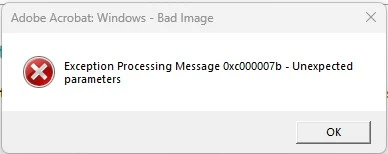
Exception Processing Message 0xc000007b - Unexpected parameters
  • October 9, 2024
  • 4 replies
  • 5019 views

We have a fleet of about 100 windows laptops and PCs (all Intune managed) and we have been experiencing this issue pretty constantly for a while now. All troubleshooting attempts didn't work. What adds the complexity is the fact that the error is intermittent and hard to replicate when testing. We have the same error with Acrobat Reader (installed from Microsoft store) and Acrobat Pro (upgraded from within Acrobat Reader). Repare Installation option seems to help for a short period but the error always returns. We have security configuration policies around disabling JS and child processes in Adobe but even machines excluded from those policies get the same error. 

This topic has been closed for replies.
Correct answer hayden_9073

Hi @pavel_7499,

We ended up fixing this by removing WDAC, which we were using for application control. Once removed, the errors stopped

WDAC is pretty average anyway in my opinion, we're going to be looking at alternatives. Threatlocker etc etc


Not sure if you're using this in particular but might be worth looking at if you are

4 replies

hayden_9073Correct answer
Participating Frequently
December 11, 2024

Hi @pavel_7499,

We ended up fixing this by removing WDAC, which we were using for application control. Once removed, the errors stopped

WDAC is pretty average anyway in my opinion, we're going to be looking at alternatives. Threatlocker etc etc


Not sure if you're using this in particular but might be worth looking at if you are

Participating Frequently
December 12, 2024

Thanks for the update. Yes, I ended up adding a record for Adobe Acrobat manually into WDAC and it's been quiet for a while. 

Participant
October 29, 2024

I HAVE FOUND A FIX THAT WORKS (for me at least). I updated windows to the most recent update, but it still wasnt working; i kept getting the error message. I went to look at the app directly. Go to Settings>Apps>Installed Apps>click on More Options for Adobe>Modify>Next>it will ask you several option, you want to click Repair>Next>it will scan for corrupt files and replace them>Update>Finish. Acter doing this, it worked for me. Hope this works for you too.

Participating Frequently
October 29, 2024

Hi James. Thank you for your reply. I apply this fix on a regular basis but it either doesn't work or only works for a short period and the issue always returns.

Participant
October 29, 2024

Sorry to hear that nothing you've tried works. Unfortunately, i am still new to the windows software, so i do not know any other fix that could work for you. Hope you find something that works soon.

Participating Frequently
October 15, 2024

Same issue here, also around 100 devices on Intune - tried basically everything available online with no luck.


We've had to revert to using Edge as the PDF viewer application in the meantime, but our hands are tied for those that wish to do more than view.


Have you had any luck since your post?

Participating Frequently
October 15, 2024

Still unsolved.

Participating Frequently
October 10, 2024

Thank you for the suggestion but that didn't work.

Participating Frequently
October 15, 2024