New Participant
May 23, 2019
Answered

Exporting a large pdf to png

  • May 23, 2019
  • 11 replies
  • 37764 views

I am wanting to export a large pdf file to png but getting this error message:
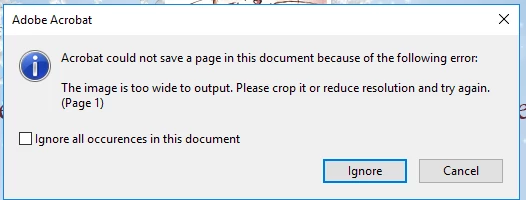
Is there any way around it? Cheers, Vicki

Correct answer AkanchhaS8194121

Hi Vicki,

As error message says, "The image is too wide to output. Please crop it or reduce resolution and try again" seems this must be causing issue with a specific PDF which has a pdf page with the large content.

I don't think so there would be a workaround to fix that specific page. But we suggest you to read this help article The Image is too wide to output. Please crop it or reduce resolution and try again (Print Production) where similar issue has been addressed and resolved.

Let us know how it goes.

Thanks,

Akanchha

11 replies

New Participant
December 1, 2024

I agree with everyone that this should not be an issue. I tried Compressing the PDF, but it did not work and was below 300pi, so I don't know what the issue was. I ended up converting it to a jpg using the online version of Adobe instead of my desktop app.  I didn't even need to use the compressed version. Hope this helps someone else who didn't want to download Photoshop.

New Participant
October 9, 2024

I was able to export as JPEG after printing first to pdf. 

There is an option within the print screen for size adjustment.  Print that, then re-open and export or save as jpeg.

Hope that helps. 

S_S
Community Manager
Community Manager
October 22, 2024

Hi @Axeman 362,


Hope you are doing well. Thanks for letting us know what worked for you!


-Souvik

New Participant
February 15, 2024

I do Cntrl+P - in print dialoge - print option we had PDF - and give a new file name. This new printed PDF file will not have the above mentioned issue. 


New Participant
October 4, 2023

I have a Dell Laptop with Windows 10 OS. I received the same error. When I Saved the PDF (Menu_Save As Other_Optimized PDF...) and then opened the new document up, export as Image worked. But agree with other users here: there ought to be a simpler way for the software to behave when confronted with  a document that "doesn't meet" the correct whatever. 

New Participant
January 7, 2025

Heyo this is the first workaround that actually worked for me, thanks!!

New Participant
February 12, 2023

The right answer if you're on a Mac is to promply give up with Adobe and open it in Preview where it exports as a JPG, PNG, etc effortlessly. 

New Participant
January 2, 2023

I'm getting the same issue, but I don't have a graphics program like photoshop, and the link that's listed as the correct answer shows a 404 error. 


Is there a way to identify the actual problem and fix it, or some other way to re-size the document? I'm using Adobe Acrobat pro. Thank you. 

Luke Jennings3
Community Expert
January 2, 2023

Does your error look like this? if so, you could use a preflight profile to re-size your pdf, so it won't exceed the maximum size, (Tools> Print Production> Preflight) or you could try to optimize your pdf to downsample (reduce the resolution) of the images (File> Save as other> Optimized pdf.

New Participant
October 5, 2021

Open PDF with a graphics program like Gimp, Photoshop, or Illustrator, and re-export (save as) a graphic filetype of choice.

Crop, resize, or reduce filesize will sacrifice resolution.

This shouldn't need to be a workaround for Acrobat, but there's no native solution in Pro DC as of now (10/2021)

busander
New Participant
October 9, 2021

Thanks a lot, this works perfect. However, as you correctly said: this shouldn't be required...

JR Boulay
Community Expert
May 1, 2021

"Is there any way around it?"

Photoshop : File menu : Open

Acrobate du PDF, InDesigner et Photoshopographe
New Participant
May 1, 2021

I had this today. I first cropped it in the obvious response, didn't work. Then I had an inspiration to compress the PDF, and it worked -- I was able to export it.

New Participant
April 8, 2020

This seems to be yet another way in which Adobe presents the user with limitations rather than empowering us.  Why limit the size of output files?  This is an obstacle to professionals; allow us to work with large files, please.

New Participant
October 9, 2024


What he/she said!