karins67519902
Participant
January 24, 2018
Answered

Exporting pages as separate files

  • January 24, 2018
  • 1 reply
  • 898 views

I saved a Word 2013 doc as a PDF, then attempted to use Adobe tools to extract the pages as separate files.  In the past, it would open the new files in Adobe automatically at which point I would save them.  Now it is going immediately to pop up Browse for Folder.  When I locate a folder for the new files, I get the error message Bad Parameter.  I don't know why it's worked in the past and not now.
This topic has been closed for replies.
Correct answer Dave__M

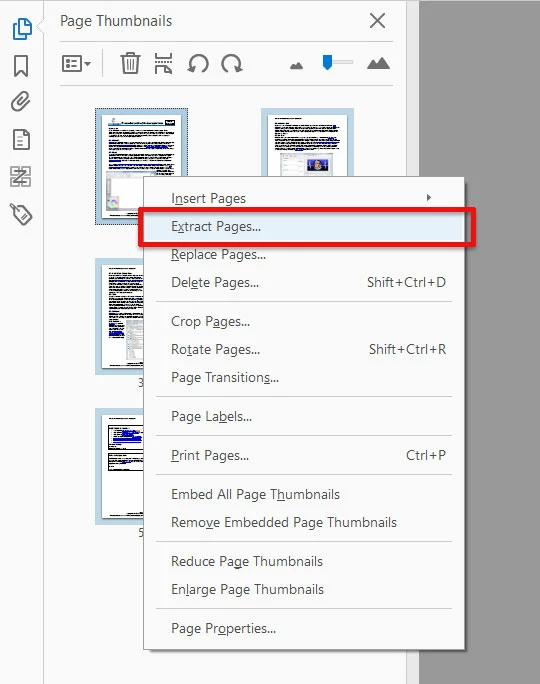
I use Acrobat's Extract Page feature to do this.  I open the Page Thumbnail panel, select all thumbnails (ctrl-A), and right-click to find the Extract Pages option. 

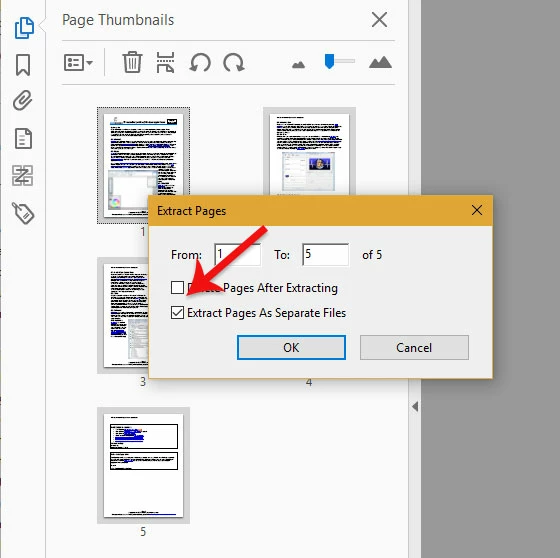
If your goal is to have all pages as a stand-alone PDF, you'd turn on the Extract Pages as Separate Files option.

You'll get to select your target folder.

I hope this is helpful.

My best,

Dave

1 reply

Dave__M
Community Expert
Dave__MCommunity ExpertCorrect answer
Community Expert
January 25, 2018

I use Acrobat's Extract Page feature to do this.  I open the Page Thumbnail panel, select all thumbnails (ctrl-A), and right-click to find the Extract Pages option. 

If your goal is to have all pages as a stand-alone PDF, you'd turn on the Extract Pages as Separate Files option.

You'll get to select your target folder.

I hope this is helpful.

My best,

Dave