

MADink_Designs27
Inspiring
October 14, 2021
Question

External JS Editor Won't Open

  • October 14, 2021
  • 6 replies
  • 4974 views

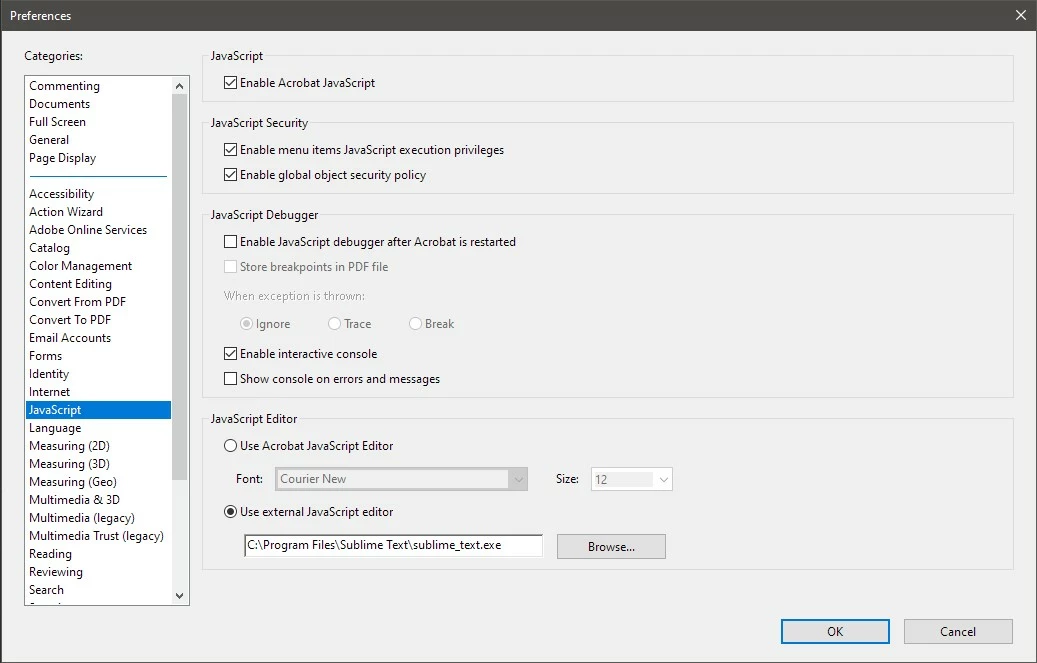
I've been using Acrobat for years and have never had an issue where the external editor will not open.


I've tried:

  • Changing to a different editor
  • Changing to the Acrobat editor and back to an external editor
  • Modifying the JavaScript settings (unchecked everything using several scenarios)


Any suggestions? I see that Tuesday, October 12, 2021 there was an update... Could the new update caused a bug?


The only other things I can think to do is try to repair the installation or try to reinstall the previous version...
 

6 replies

JR Boulay
Community Expert
Community Expert
March 25, 2025

The trick is not to use the “External Editor” function.
To avoid bugs and nasty surprises, I use Notepad++ (or BBEdit on the Mac) and copy-paste into Acrobat's editor.

Acrobate du PDF, InDesigner et Photoshopographe
Participant
October 24, 2025

Considering some javascript code is too long for Acronbat's editor to even open, that's not a very useful trick.  Right now I have the same problem and since Acrobat will not allow the external editor to launch, it's impossible for me to edit the code.

Participant
October 24, 2025

To fix this, go into Edit / Preferences / Security (Enhanced) and uncheck "Enable Protected Mode at Startup" under Sandbox Protections.  When you restart Acrobat, external editors should work.

Participant
March 25, 2025

I discovered Microsoft Defender antivirus/threat protection was blocking Notepad++.
Block Rule: "Block Adobe from "creating child processes"

Inspiring
August 25, 2022

I have a similar problem. My favorite Editor, EditPad Pro, did work fine as an external JS-Editor for years - until 3 days ago! No Error-message, nothing, The Editor simpy don't start working. Now strange:

1. Windows Notepad works well

2. Notepad+++ works well

3. And when I sign up as Admin even EditPad Pro works well!?!

But as normal User ...

Since MADink_Designs27 issue wasn't solved really, I hope someone from Adobe jumps in 🙂

Inspiring
September 9, 2022

Guess I better open a new thread, seems, that noone cares for the old ones?

MADink_Designs27
Inspiring
March 7, 2023

Did you ever find a solution to this?

Participant
January 26, 2022

How was this rectified?  I'm having the same problem

MADink_Designs27
Inspiring
January 26, 2022

No, but I'm no longer working on JS forms. The last time I was using them, it was not working. I had to copy and paste script from my editor into notepad.

Bernd Alheit
Community Expert
Community Expert
October 14, 2021

Try the editor notepad++

MADink_Designs27
Inspiring
October 14, 2021

Thank you for your reccomendation. I'm familiar with Sublime Text and would prefer to stick with that. VS Code doesn't work either. This has now been tested on three different machines under different accounts.

Why would some editors work and others aren't but previously were?

I have already submitted to Adobe Uservoice.

MADink_Designs27
Inspiring
October 18, 2021

Is there a way to revert back to a previous build of Acrobat?

Other CC applications have a way to install previous. It doesn't seem to be the case with Acrobat...

MADink_Designs27
Inspiring
October 14, 2021

I tried repairing the installation without success.


I also opened a form on another computer with a different Adobe license, and it does not open the editor either. I'm beginning to think this is a bug with the latest version, but the CC app doesn't seem to have a place to download the previous version...

Participant
October 14, 2021

Upon further testing, notepad is the only external editor I've been able to get to work thus far.